
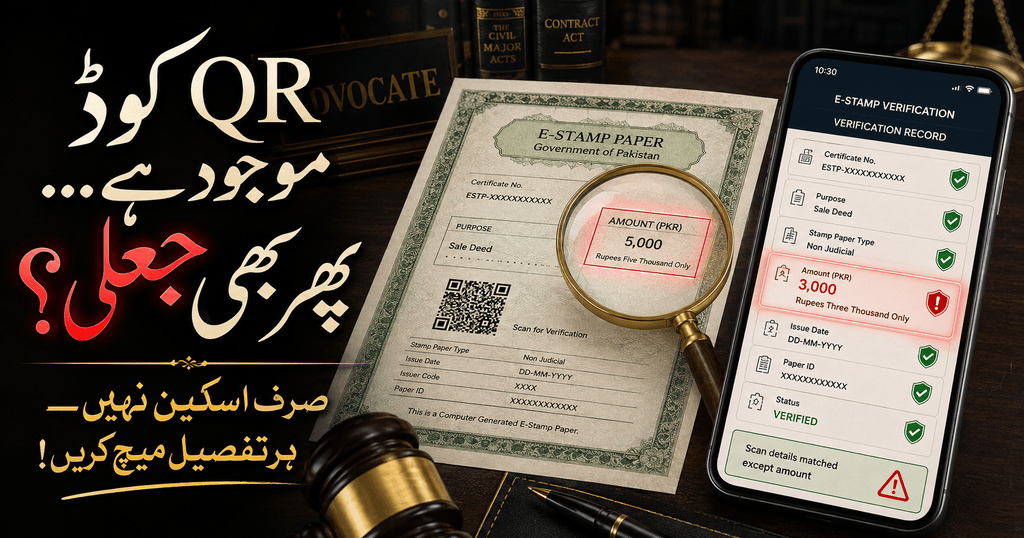
A stamp paper can carry a QR code, official-looking colours and a convincing serial number—and still be unsafe to rely on. E stamp verification is the quickest first check, but a successful search result is only useful when every online detail is compared with the paper in front of you.
This guide explains the official verification routes for Punjab, Sindh, Khyber Pakhtunkhwa and Balochistan; the safer approach for Islamabad and other regions; the meaning of common stamp numbers and statuses; and what to do if a result is missing, altered, refunded, delisted or inconsistent. It also answers the question most short guides overlook: what does an online result not prove?
Quick answer: Identify the province or territory that issued the stamp, open only its official government portal, enter the e-stamp number in the correct field, and compare the returned status, amount, purpose, parties, issue date, property particulars and payment record with the document. Do not proceed if any material detail differs.
A safe e stamp verification therefore checks both the digital record and the paper presented for use.
Last fact-checked: 20 August 2026. Portal layouts and administrative procedures can change, so confirm the current instructions displayed on the relevant government website.
Table of Contents
What Is E Stamp Verification?
E stamp verification is the process of checking an electronically issued stamp against the issuing government’s digital record. A genuine result normally connects a unique number to information such as the stamp amount, date, instrument or purpose, parties, payment details and current status.
Punjab’s official information explains that an e-stamp can be checked by scanning its QR code or entering the stamp number on the verification page. The Punjab Information Technology Board also explains that the central database was created to make verification easier and reduce fake and fraudulent practices.
The principle is simple:
| What you hold | What the official portal supplies | What you must do |
|---|---|---|
| Printed e-stamp, PDF or copy | Government database record | Compare the two line by line |
| QR code | A route to an online page or record | Confirm the destination domain and returned details |
| E-stamp/UIN number | Unique search key | Enter it exactly in the correct jurisdiction’s portal |
| Challan or PSID | Payment or application reference | Do not confuse it with the issued stamp certificate |
| Stamp status | Current system description | Stop and investigate any adverse or unclear status |
Why Can a Genuine Number Still Be Used in a Fraud?
A fraudster does not always invent everything. A genuine QR code or number can be copied from one stamp and placed on another page. The copied code may open a real government record, but the parties, amount, property, purpose or printed wording around it may have been changed.
That is why e stamp verification is not merely “scan and see a green page.” A proper e stamp verification asks whether the complete official record matches the complete document presented for signature or payment.
A photocopy creates the same risk. Its number may belong to a genuine certificate, yet the copy itself may be altered, incomplete or reused in a different transaction. Verification should therefore be performed on the full document, not on an isolated screenshot of its QR code.
What Does E Stamp Verification Prove—and What Does It Not Prove?
This distinction can prevent a major property or contract dispute.
What an official match can help prove
- The searched number exists in the issuing system.
- The database connects that number with the displayed stamp amount and particulars.
- The stamp carries the status currently shown by the portal.
- The payment, challan, party, deed or property information displayed by that portal can be compared with the paper.
What it does not automatically prove
- That the seller owns the property.
- That the signer is the named person or signed voluntarily.
- That a power of attorney is genuine, current and wide enough for the transaction.
- That witnesses, signatures, thumb impressions or notarisation are authentic.
- That the agreement was drafted lawfully or contains every page shown to the parties.
- That the correct stamp duty was paid for the true nature and value of the transaction.
- That a document requiring registration has been registered.
- That the property is free from litigation, mortgage, attachment, inheritance claims or third-party rights.
- That the same certificate has not been copied onto another document outside the system record.
For property transactions, combine the stamp check with the title-chain and possession safeguards in our guide to Property Law in Pakistan. A portal match is one layer of due diligence, not a government guarantee of the entire deal.
Which Number Should You Enter?
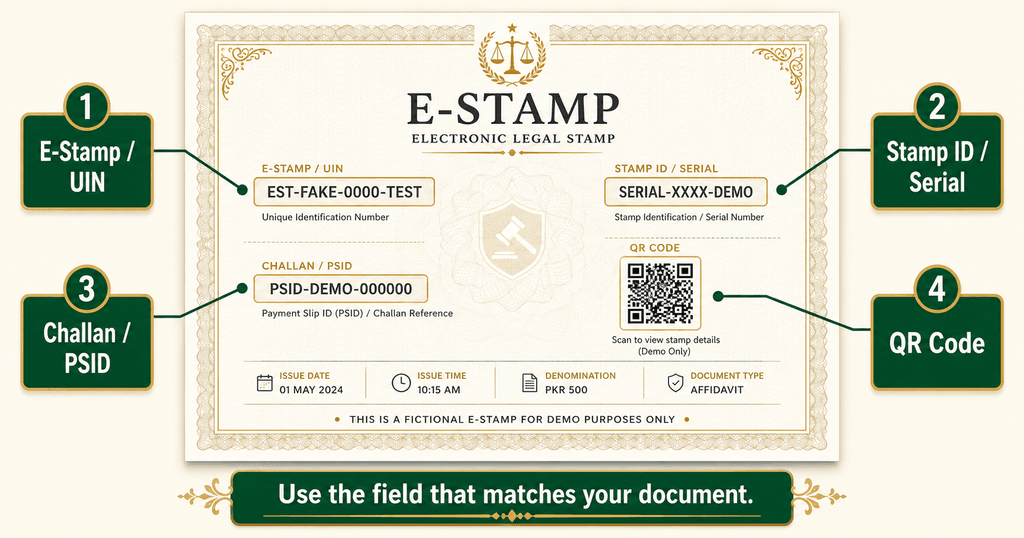
Several numbers may appear on the same page. Using the wrong one is a common reason for a “not found” result.
E-stamp number or UIN
This is the unique number assigned to the issued stamp. Depending on the portal or document, it may be described as an e-stamp number, stamp number, UIN, certificate number or ID. This is normally the main key for e stamp verification.
Stamp ID or serial number
Low-denomination stamps issued through authorised vendors may use a stamp ID or serial number. Punjab’s verification page currently provides a separate search option for specified low-denomination vendor stamps, while Sindh also displays a separate low-denomination search route.
E-challan, Challan 32-A or PSID
A challan identifies an application or payment. It is useful for payment confirmation, reprinting or retrieving the connected certificate. It is not automatically the same thing as the issued stamp paper. Sindh’s portal expressly offers an e-challan search for paperless transactions, so follow the description shown by the relevant portal instead of applying one province’s procedure nationwide.
QR code
A QR code is a shortcut, not a conclusion. Scan it, confirm that it opens the correct government domain, and then compare the returned record with the full paper. Close the page immediately if it asks for an unnecessary password, bank PIN, OTP, card details or app installation.
Official E Stamp Verification Portals in Pakistan
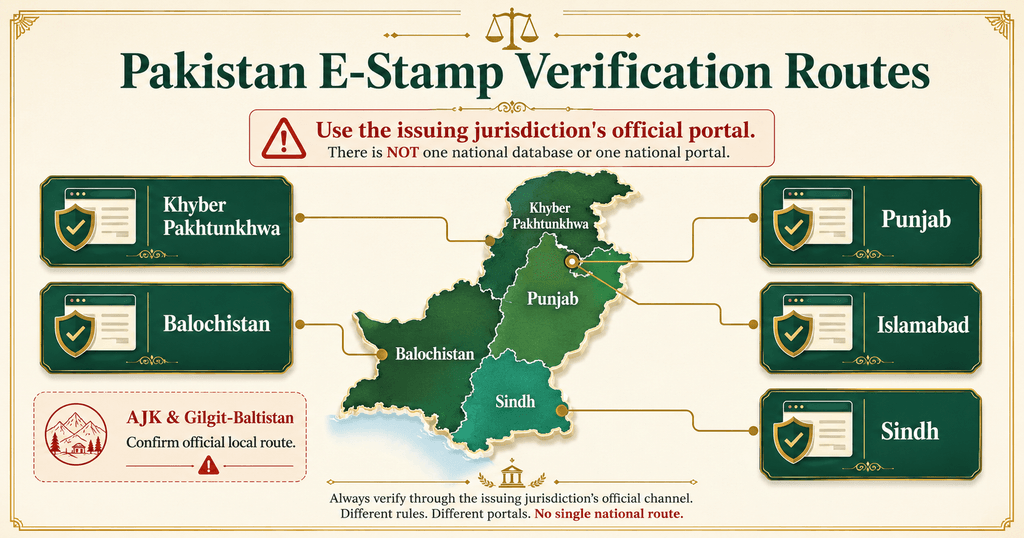
Pakistan does not operate one clearly indexed public verification page covering every province and territory. Always use the portal of the government that issued the stamp.
| Issuing jurisdiction | Official route | Search options currently visible | Important note |
| Punjab | Punjab Verify Stamp | E-stamp number; separate stamp ID/serial option for listed low-denomination stamps | The official FAQ also provides web and SMS services. Follow the current format displayed on the portal or certificate. |
| Sindh | Sindh Verify Stamp | E-stamp number; e-challan number for paperless transactions; stamp ID/serial for low-denomination stamps | Use the exact search tab matching the number printed on your paper. |
| Khyber Pakhtunkhwa | KP E-Stamping | “E-Verify” using the stamp-paper number; QR-based checks on supported stamps | KP’s 2026 e-vendor rollout uses QR-based verification and prescribed security features in participating districts. |
| Balochistan | Balochistan E-Stamp Verification | E-stamp number | The .gob.pk ending refers to the Government of Balochistan—not the federal capital. |
| Islamabad Capital Territory | Follow the verification route or QR printed on the ICT-issued e-stamp and confirm through the issuing authorised channel or ICT Administration | ICT introduced e-stamping in 2026, but a standalone official public verification URL was not clearly indexed when this guide was checked | Do not assume that Punjab’s, Sindh’s or Balochistan’s portal covers an ICT-issued paper. |
| AJK or Gilgit-Baltistan | Confirm with the relevant Board of Revenue, Collector/Treasury or issuing office | A public official verification portal could not be confirmed during this review | Never upload CNIC images or documents to an unofficial “verification” website merely because it ranks on Google. |
The safest practice is to type or bookmark the official domain. Every e stamp verification should begin with this domain check because a sponsored result, WhatsApp link or lookalike spelling can lead to a fake portal.
How to Complete E Stamp Verification in 7 Steps
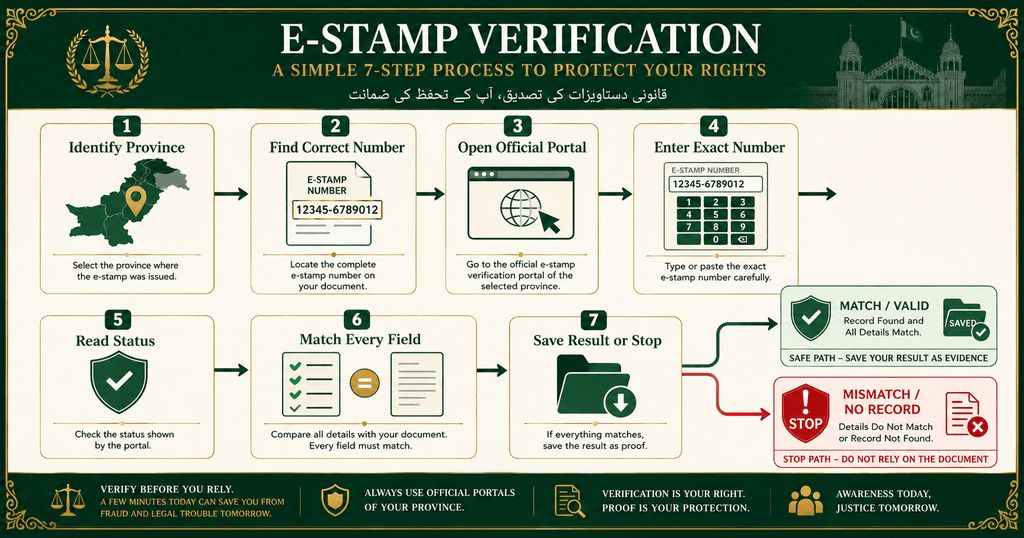
Step 1: Identify the issuing jurisdiction
Look for the issuing government, district prefix, portal address and Board of Revenue details. The place where the parties live is not always the same as the jurisdiction that issued the stamp.
Step 2: Find the correct search number
Locate the e-stamp/UIN number first. Accurate e stamp verification depends on selecting the correct identifier. If the paper is a low-denomination vendor stamp or a paperless e-challan, use the corresponding search field offered by that portal. Remove accidental spaces but do not alter letters, zeros or other characters.
Step 3: Open the official government page
Use the province-wise table above. Check the entire domain before entering anything. E stamp verification should not require you to send the document to a private agent.
Step 4: Enter the number exactly
Type the number rather than trusting only the QR code. If the portal uses a captcha, complete it and press search once. Repeated rapid attempts may trigger a temporary security block.
Step 5: Read the status before anything else
Do not stop when a record appears. Note whether the stamp is shown as issued, active, used, utilised, delisted, cancelled, refunded or under another status. Wording differs across systems.
Step 6: Compare every material field
Match the amount, date, document type, purpose, parties, CNIC fragments, property details, challan, payment information, pages and vendor details—whichever fields the portal displays. One material mismatch is enough reason to pause.
Step 7: Save the result and act on any discrepancy
Save a dated PDF or screenshot showing the official domain and result. For an important agreement or property deal, repeat e stamp verification immediately before signing and preserve the result with the transaction file.
The 12-Point Match Test Before You Sign
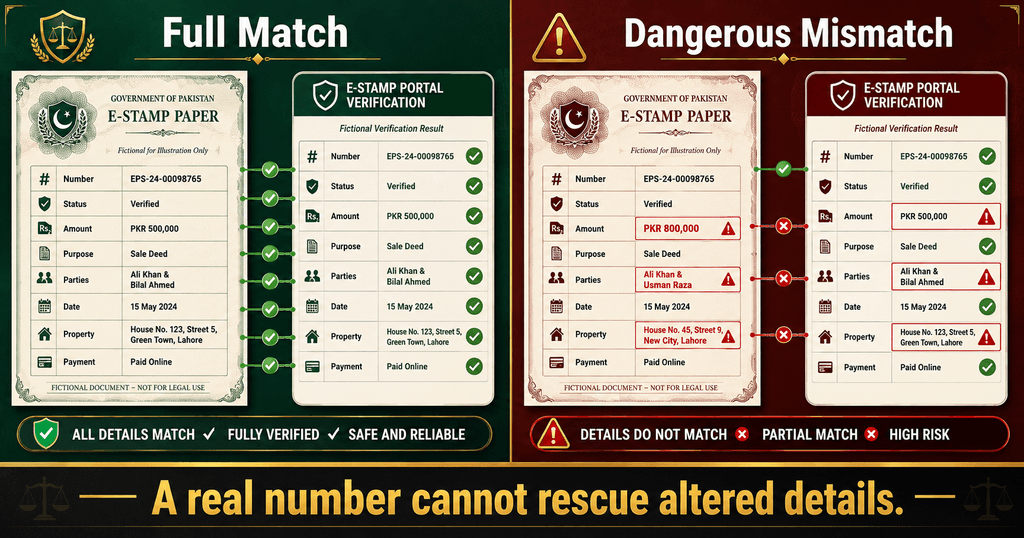
Use this e stamp verification checklist even when the portal finds the number:
- Stamp number: Does every character match?
- Status: Is it appropriate for the proposed transaction?
- Stamp amount: Does the portal show the same amount as the paper?
- Issue date: Is the date identical and logically connected to the transaction?
- Instrument or deed: Is it an affidavit, agreement, conveyance, power of attorney or the correct listed instrument?
- Purpose or description: Does it describe the same legal use?
- Applicant or purchaser: Does the name and available identity data match?
- Other party: Where shown, does the seller, purchaser, landlord, tenant or authorised person match?
- Property details: Do district, tehsil, area, address, classification and declared value match the deal?
- Payment/challan: Does the amount, payment status and reference correspond with the certificate?
- Pages: Does the portal’s page count match the complete instrument and continuation sheets?
- Vendor or issuing channel: Is the vendor or bank information consistent with the issuing record?
For a sale deed, this check should sit beside the safeguards discussed in Fake Sale Deed in Pakistan. The number may be real while the transaction built around it remains disputed.
How to Read Common E-Stamp Statuses Safely
Portal terminology is not perfectly uniform. During e stamp verification, treat the following as practical guidance, not a substitute for the explanation given by the issuing authority.
| Status or result | Safe interpretation | What to do next |
| Issued/active/valid | A record exists and is currently presented as issued | Complete the full 12-point match; do not rely on status alone |
| Used/utilised | The system may record that the stamp has already been consumed in a transaction | Confirm the recorded use; never accept it for a new transaction without official clarification |
| Delisted | The stamp has been removed from ordinary active use or reached a system-defined stop point | Do not guess why; contact the issuing authority and preserve the result |
| Refunded/cancelled | Payment or certificate may no longer be available for use | Reject it for a fresh transaction unless the authority formally resolves the issue |
| Pending/unverified | A required payment, treasury or system step may be incomplete | Wait for official completion; do not sign or release money |
| Not found/no record | The portal did not return a record for that search | Check province, number and search field; if still missing, stop and escalate |
| Portal error | The system did not complete the search | Retry later or through the official help channel; never treat an error as a successful verification |
Some low-denomination Punjab stamps display a printed transaction-use period and “delisted on/validity” information. Do not turn that specific condition into a universal rule for every e-stamp in Pakistan. Read the conditions printed on the certificate and the current portal status.
What If the Portal Says “No Record Found”?
A missing result during e stamp verification is serious, but it does not prove forgery by itself. Work through this order:
- Confirm that you selected the issuing province or territory.
- Recheck ambiguous characters such as
0/O,1/Iand missing prefixes. - Try the correct e-stamp, serial or e-challan field.
- Scan the QR code only to compare the destination and number—not to bypass the mismatch.
- Check whether the document was issued moments ago and the official system is still processing it.
- Use the contact or help details shown on the official portal.
- Ask the issuing bank, authorised vendor, Treasury/Collector or Sub-Registrar to confirm the record.
- Refuse to sign, pay, register or hand over possession until the discrepancy is resolved in writing.
Take a screenshot before contacting anyone. A later change in status can become important evidence.
Punjab E Stamp Verification by Web and SMS
For web-based e stamp verification in Punjab, open the official “Verify Stamp” page and select the field matching your certificate. The portal currently distinguishes the main e-stamp number from the stamp ID/serial route for listed low-denomination vendor stamps.
Punjab’s official FAQ also lists an SMS route through 8100. It directs users to send the e-stamp command with the 16-digit number. Because SMS formats and services can change, copy the exact format from the current official FAQ or printed certificate instead of relying on an old social-media post. Network charges may apply.
The web result is preferable for a transaction file because it allows you to inspect more fields and save the page. SMS can serve as an additional check; it should not replace the line-by-line comparison.
Sindh E Stamp Verification: Choose the Right Tab
The Sindh e-Stamping Citizen Portal offers more than one route. Its verification page currently allows searches by:
- e-stamp number;
- e-challan number for paperless transactions; and
- stamp ID/serial number for low-denomination stamps.
If the portal finds the challan but no stamp has been issued, do not describe the payment record as a completed certificate. Confirm the displayed payment, treasury and issuance information before relying on it. Sindh e stamp verification should be performed again after any corrected or replacement document is issued.
Khyber Pakhtunkhwa E Stamp Verification
The KP portal provides an “E-Verify” function. The Revenue & Estate Department’s 2026 e-vendor notification confirms QR-code-based verification and prescribed security features for the e-vendor rollout, initially introduced district by district.
Enter the stamp-paper number on the official KP portal and compare the returned information. A white-paper printout is not suspicious merely because it lacks old-style pre-printed stamp paper; what matters is authorised issuance, the security features and the official record.
Balochistan E Stamp Verification
Balochistan operates an official .gob.pk e-stamping site with a web verification page. Enter the e-stamp number and compare the returned record with the paper.
The domain is sometimes mistaken for “Government of Pakistan” or an Islamabad portal. The site itself carries Government of Balochistan identification. This jurisdiction check matters because a genuine number searched in the wrong provincial database may return nothing.
Islamabad E Stamp Verification After the 2026 Rollout
Islamabad introduced digital e-stamping in 2026. When this article was reviewed, search results did not expose a clearly indexed standalone official ICT verification URL comparable to Punjab’s or Sindh’s public page.
For an ICT-issued certificate:
- follow the QR or verification instruction printed on that certificate;
- confirm that the destination is an official or expressly authorised ICT/PLRA route;
- obtain the complete issuance and payment record from the authorised channel;
- contact ICT Administration or the relevant issuing/registration office if the route is unclear; and
- do not search the number on Balochistan’s
.gob.pkportal merely because “gob” looks federal.
This section should be updated when ICT publicly indexes a stable official verification page.
11 Red Flags of a Fake, Altered or Reused E-Stamp
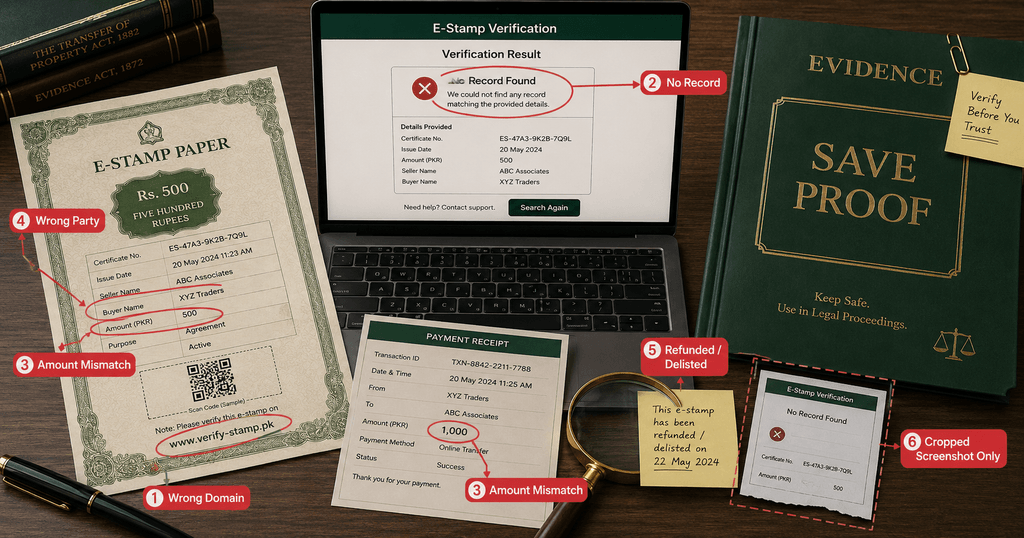
Stop the transaction if you notice any of these warning signs:
- The QR code opens a shortened, private or misspelled domain.
- The stamp number cannot be found after the correct search is repeated.
- The portal amount differs from the printed amount.
- The purpose or deed type differs from the agreement.
- A party’s name, CNIC fragment or role does not match.
- Property location, area or value differs from the online record.
- The paper shows signs of pasted text, uneven fonts, blurred fields or misaligned boxes.
- A status indicates refund, cancellation, prior use or another restriction.
- The other party provides only a cropped screenshot and refuses the full certificate.
- A vendor demands payment into a personal account but cannot produce the official challan or receipt.
- You are pressured to sign before e stamp verification can be completed.
One red flag may have an innocent explanation. It is still a reason to pause until the issuing authority confirms the position.
What Should You Do If the Stamp Looks Fake?
Do not alter, destroy or return the only copy before preserving evidence. Take the following steps:
- Stop signing, payment, registration and transfer of possession.
- Save the full PDF, paper photographs, QR destination, portal result and date/time.
- Preserve payment receipts, bank details, messages, emails, advertisements and call records lawfully available to you.
- Ask the issuing bank, authorised vendor and relevant Board of Revenue/Treasury office for written confirmation.
- For property, notify your lawyer and the Sub-Registrar before completion.
- If forgery, cheating or online impersonation appears involved, seek legal advice about reporting the matter to the police and the competent cybercrime authority.
- Do not post unredacted CNICs, signatures or the full certificate on social media.
Using a document as genuine while knowing or having reason to believe it is forged can carry criminal consequences under the Pakistan Penal Code. Do not confront a suspected fraudster alone where there is a safety risk.
The Legal Effect of a Verified or Defective Stamp
The Stamp Act, 1899 governs stamp duty, subject to provincial amendments and schedules. E stamp verification supports the authenticity inquiry, while Section 35 broadly restricts an instrument chargeable with duty from being admitted in evidence, acted upon, registered or authenticated unless it is duly stamped, subject to the Act’s provisos and applicable procedure.
Three separate questions must therefore be asked:
- Authenticity: Does the e-stamp exist and match the official record?
- Sufficiency: Is the correct duty paid for the true instrument and transaction value?
- Validity of the transaction: Are title, consent, capacity, authority, execution, witnesses and registration legally sound?
E stamp verification mainly answers the first question and supplies evidence relevant to the second. It does not automatically answer the third.
The same warning applies to notarisation. Read our explanation of what a Notary Public seal proves before treating a stamp or seal as a cure for missing signatures, incomplete pages or doubtful consent.
Property Buyers Need More Than E Stamp Verification
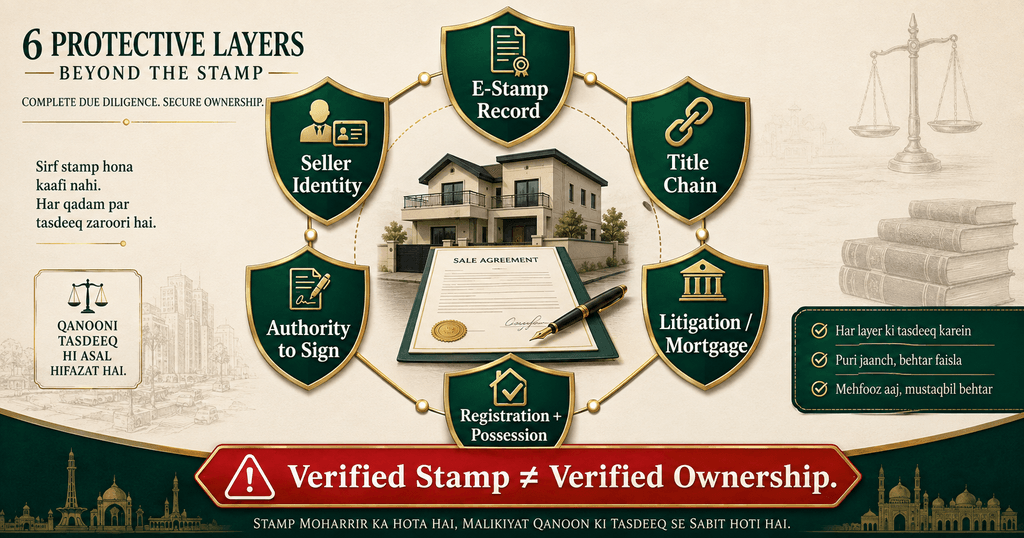
Before paying for immovable property, build a layered file:
- Verify the seller’s identity and legal capacity.
- Trace the source and chain of title.
- Obtain current land, society or development-authority records.
- Check mutation history, inheritance, co-ownership and possession.
- Verify any General Power of Attorney in Pakistan from its issuing and registration records.
- Search for litigation, attachment, mortgage and acquisition issues.
- Confirm the deed type, valuation and current stamp duty.
- Complete e stamp verification and preserve the result.
- Ensure lawful execution, witnesses, registration and post-transfer record updates.
The safest file connects the certificate, the agreement and the property record. None should be reviewed in isolation.
E Stamp Verification for Overseas Pakistanis
An overseas buyer, seller or principal can perform e stamp verification remotely, but distance increases impersonation and document-substitution risk.
Ask for:
- the complete certificate PDF, not only a QR screenshot;
- the challan/payment receipt and issuing-channel details;
- a live or independently verified identity check where appropriate;
- the full agreement with page numbers and initials;
- verified authority if a representative is acting under a power of attorney; and
- a dated portal result saved by your lawyer before execution.
Share redacted working copies where possible. A full CNIC, signature and QR code can themselves be misused if circulated carelessly.
9 Common Verification Mistakes
- Searching a Punjab stamp on the Sindh or Balochistan portal.
- Entering the challan number in the e-stamp-number field.
- Treating a working QR code as complete proof.
- Comparing only the amount and ignoring parties or purpose.
- Accepting “not found” as a harmless website problem.
- Assuming “issued” means “unused and legally sufficient.”
- Publishing the full certificate online to ask strangers for help.
- Checking days before signing but not repeating the search at completion.
- Believing e stamp verification proves ownership or replaces registration.
Final E-Stamp Safety Checklist
Before you rely on any e-stamp, confirm all of the following:
- Correct issuing jurisdiction identified
- Official government portal used
- Correct e-stamp/serial/e-challan field selected
- Number matches exactly
- QR opens the correct official route
- Status is understood and acceptable
- Amount, date, purpose and deed type match
- Party and available CNIC details match
- Property and payment particulars match where applicable
- Page count and continuation sheets are complete
- Duty sufficiency checked separately
- Title, authority, signatures, witnesses and registration checked separately
- Dated result saved with the transaction file
If one important box remains unchecked, pause the transaction.
Frequently Asked Questions About E Stamp Verification
Is e stamp verification free in Pakistan?
Official web portals do not normally display a separate fee merely to search an e-stamp number. Internet, SMS or network charges may apply. Avoid private websites asking for payment or unnecessary identity documents just to show a public verification result.
Can I complete e stamp verification by CNIC?
Public verification pages primarily use an e-stamp number, stamp ID/serial or e-challan number. They are not general portals for searching every stamp connected with someone else’s CNIC. Use the number printed on the certificate and protect identity information.
Is scanning the QR code enough?
No. A genuine QR code can be copied. Confirm the destination domain and compare every material field returned by the government record with the full paper.
Why does my e-stamp show “no record found”?
Possible reasons include the wrong jurisdiction, a typing error, the wrong search field, a newly issued item still processing, a portal problem or a suspicious certificate. Recheck the inputs and obtain confirmation from the official issuing authority before proceeding.
What does “delisted” mean on an e-stamp?
Treat it as a stop signal. The reason can depend on the system, stamp category and transaction history. Do not assume that it is valid or fake from the word alone; request an explanation from the issuing authority.
Does a verified e-stamp prove property ownership?
No. It helps verify the stamp-duty record. Ownership must be checked through the title chain, registered instruments, revenue or society records, inheritance, possession and other transaction-specific evidence.
Can the same e-stamp be used twice?
It should not be accepted for a different transaction merely because the number is genuine. Check the status, purpose, parties and recorded use. A copied certificate may still display a genuine number.
Is a paid challan the same as an issued e-stamp?
Not automatically. A challan generally records application or payment information. Confirm that the stamp certificate has been issued, unless the relevant government’s paperless process expressly treats the e-challan as the operative record.
Can old manual stamp paper be verified online?
Not necessarily. Older paper may require verification from Treasury/Collector records, the licensing authority or the issuing vendor’s official register. Never force a manual serial number into an unrelated e-stamp portal.
Does an e-stamp expire?
There is no safe one-line answer for every category and jurisdiction. Some certificates—especially certain low-denomination vendor stamps—may print a transaction-use period or delisting date. Read the particular certificate, portal status and applicable rules instead of assuming one universal expiry period.
Does a verified e-stamp still need notarisation or registration?
That depends on the instrument and its intended use. E stamp verification does not replace notarisation, attestation, witnesses or compulsory registration where the law or receiving authority requires them.
Which portal should I use for e stamp verification in Pakistan?
Use the official portal of the government that issued the stamp: Punjab, Sindh, KP or Balochistan. For ICT and any jurisdiction without a clearly indexed public page, follow the verification route printed on the certificate and confirm it through the relevant official issuing authority.
Conclusion: A Real Number Is Only the First Check
E stamp verification can expose a fake, altered, refunded or reused certificate before money, possession or legal rights change hands. The safest e stamp verification compares the full database record with the full document and then checks the underlying transaction separately.
Verify the stamp. Verify the people. Verify the property or legal right. Verify the authority to sign. Only then should you proceed.
Legal-awareness disclaimer: This article provides general information, not advice for a particular transaction or dispute. Stamp duty, portal features and procedures vary by jurisdiction and may change. Obtain current confirmation from the relevant authority and consult a qualified lawyer before relying on an important document.