

Your land is in the village. You live in Lahore, Karachi or Dubai, and you have not seen its record in years. Then one day a relative casually says, “Woh zameen to kab ki intiqal ho chuki.” Your heart sinks, because you never sold anything.
Land fraud often starts quietly, on paper, while the owner is far away. The good news is that you no longer need a patwari or an agent to check. With Online Fard Punjab, you can see your land record on your phone through the official Punjab Zameen app, and keep proof of exactly what it says.
This guide to online Fard Punjab shows the 5 easy steps, the new 2026 fee, what a CNIC search can and cannot do, how to spot a fake Fard, and the one dangerous mistake that still costs buyers their savings.
Table of Contents
Quick Answer: How to Get Online Fard Punjab Today
Short answer: for online Fard Punjab, use the official Punjab Zameen app made by the Punjab Land Records Authority (PLRA), or visit any Arazi Record Centre (ARC). Here is what you need to know in one look:
- Official app: Punjab Zameen on Google Play, also on the Apple App Store. Check that the developer is Punjab Land Records Authority.
- Official website: the Online Fard portal, mainly used to print a Fard you have already requested.
- Fee: Rs900 for an ordinary copy and Rs4,000 for an express copy, under PLRA’s charges for 2026-27.
- What it proves: what the land record says today. It does not, on its own, prove a clean title or let you sell.
- For a sale: you still need a Fard for sale (Fard-e-Bai) from the ARC, then the registry and intiqal.
Practical tip: take a screenshot of the PSID and payment receipt before you close the app. It saves a lot of trouble if the Fard does not arrive.
What Is a Fard? 4 Types Every Owner Should Know
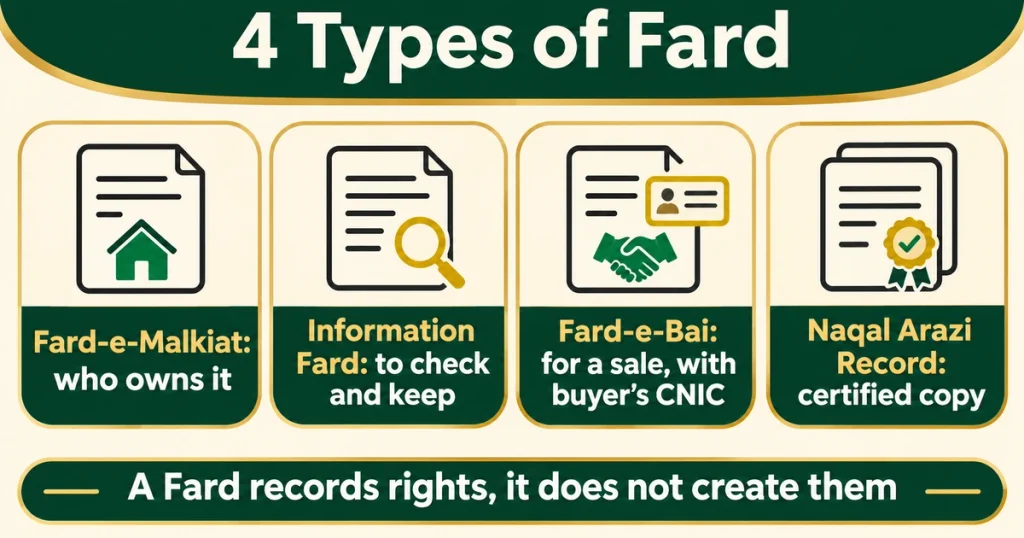
A Fard is an official extract of the land record, taken from the register of landowners (register haqdaran-e-zameen, often called the jamabandi). It shows who the record names as owner, their share, and the land’s khewat, khatooni and khasra numbers, area and any charge on it.
| Type | What it is | Where you get it |
|---|---|---|
| Fard-e-Malkiat (ownership Fard) | Shows the recorded owner, share and land details | Punjab Zameen app or ARC |
| Fard for information | A record copy to check or keep | Punjab Zameen app or ARC |
| Fard-e-Bai (Fard Baraye Bai) | Issued for a sale; since January 2026 it must carry the buyer’s name and CNIC | ARC, with the owner present |
| Naqal Arazi Record | Certified copy of the land record, made valid again for deals in July 2026 | ARC |
Two facts matter here. First, a Fard for sale is not available in the app yet; the app’s own store page lists “process fard for sale” as a future feature. Second, a Fard records rights but does not create them. Under section 52 of the Punjab Land Revenue Act 1967, its entries are presumed true only until the contrary is proved.
Online Fard Punjab: 5 Easy Steps on the Punjab Zameen App
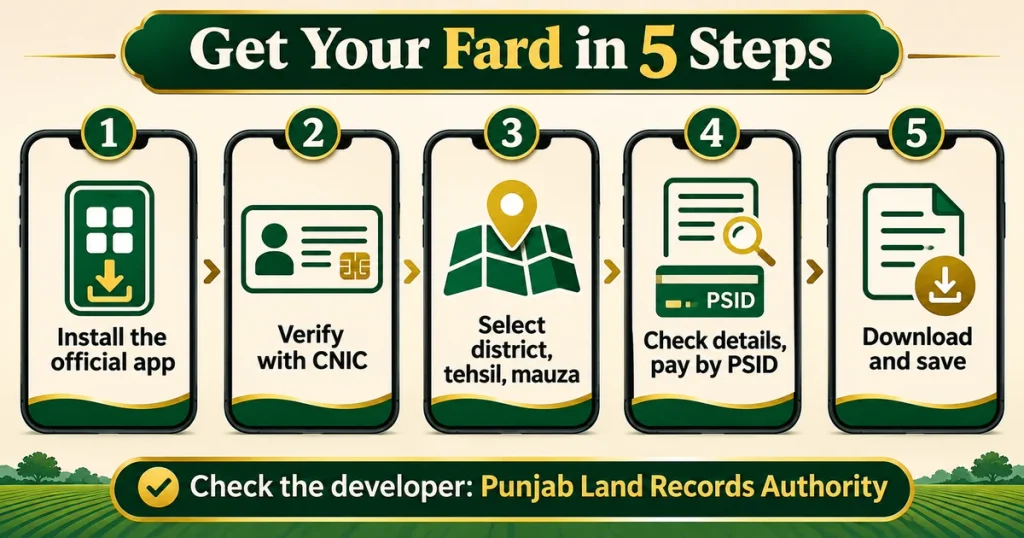
PLRA’s official app page says the app lets you verify ownership, apply for a Fard and track mutation status. Before you start your online Fard Punjab request, keep your CNIC and land details (district, tehsil, mauza, and khewat or khasra number) ready.
- Install the right app. Download Punjab Zameen from Google Play or the App Store. The developer must be Punjab Land Records Authority. Never install an APK file sent to you on WhatsApp.
- Sign up and verify yourself. Register with your CNIC and mobile number, then complete the identity check the app asks for.
- Find your land record. Choose the Fard service, select your district, tehsil and mauza, then search with the khewat or khasra details it asks for.
- Check, then pay. Read the owner’s name, share and area carefully. Then generate the PSID and pay through one of the banking channels the app shows.
- Download and save. Download the Fard, keep the PDF and the payment receipt together, and print a copy if you need one.
If sign-up or CNIC verification keeps failing, do not pay an agent to “fix” it. Visit the nearest ARC with your original CNIC; the staff can check whether your CNIC is linked to the land record.
Using the Online Fard Punjab Website
The Online Fard portal is PLRA’s web service. At present it mainly offers a Print Fard option for a request you have already made, using the reference it asks for. Older guides that describe a full web sign-up and land search may be out of date, so start with the app if you are applying fresh.
Online Fard Punjab Fee: The New 2026-27 Charges
PLRA raised its land-record charges in July 2026 for the financial year 2026-27, with immediate effect. The same rates apply to copies of a Fard, a mutation (intiqal) and a girdawari record.
| Service | Fee now | Earlier fee |
|---|---|---|
| Ordinary copy of a Fard | Rs900 | Rs800 |
| Express copy (Mobile ARC and Universal Access) | Rs4,000 | Rs3,500 |
| Land record through a Pakistani mission abroad | Extra USD 50 per transaction | New charge |
Older guides online still quote lower amounts, so do not be surprised by the higher figure. Your challan may also include other government charges. The rule is simple: pay exactly what the system-generated PSID shows, and nothing extra to anyone.
How to Pay the Fard Fee Safely
- Pay only against the PSID generated in the app or at the ARC
- Use your own bank app or a bank counter; never send money to a personal account or wallet number
- Keep the PSID and receipt until the Fard is in your hand
- If money is deducted but no Fard arrives, do not pay again; contact PLRA with your PSID
Can You Check Land Record by CNIC or by Name?
By your own CNIC: yes. The Punjab government has introduced a digital platform where citizens enter their CNIC to see properties registered in their own names, with a QR scanning facility to check records. For most people, this is the fastest way to confirm that their land is still in their name.
By someone else’s CNIC or name: do not count on it. No official PLRA service has been announced that lets you pull another person’s full property list by CNIC or name. Treat any website that promises “check anyone’s land by name” with caution.
If your own land does not appear under your CNIC, the record may not yet be linked to your CNIC, or the mauza may not be fully computerised. Visit the ARC with your CNIC and old papers (Fard, registry, intiqal) and ask them to link it.
How to Verify a Fard Is Genuine
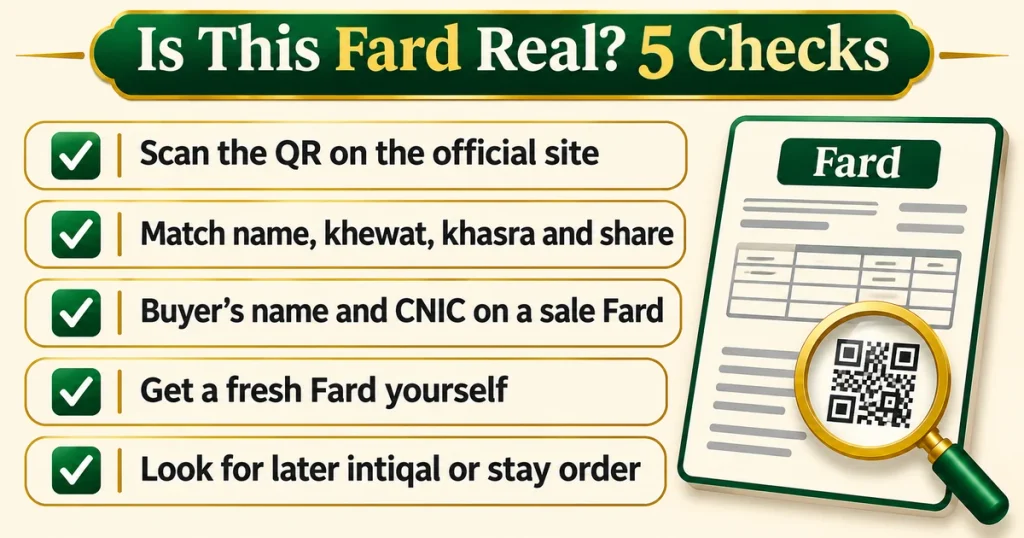
A forged Fard can look perfect on paper or on a WhatsApp screen. Before you trust one, run these five checks:
- Scan the QR code and make sure the result opens on an official punjab-zameen.gov.pk page, not on any other website.
- Match every detail: owner’s name, father’s name, khewat, khasra, area and share must agree with the record shown.
- Check the buyer’s details on a Fard for sale. Since January 2026, the buyer’s name and CNIC must be printed on it, and PLRA says such Fards can be verified online through its land records portal.
- Get a fresh Fard yourself from the app or the ARC, instead of trusting a copy someone hands you.
- Look for later changes: a newer intiqal, a stay order or a mortgage may not appear on an old Fard.
Keep two questions separate. “Is this Fard real?” is answered by the official record. “Is this person’s title safe?” needs the registry, the full chain of intiqals and, for a big purchase, a lawyer’s check.
Is Online Fard Punjab Valid for Selling Property?
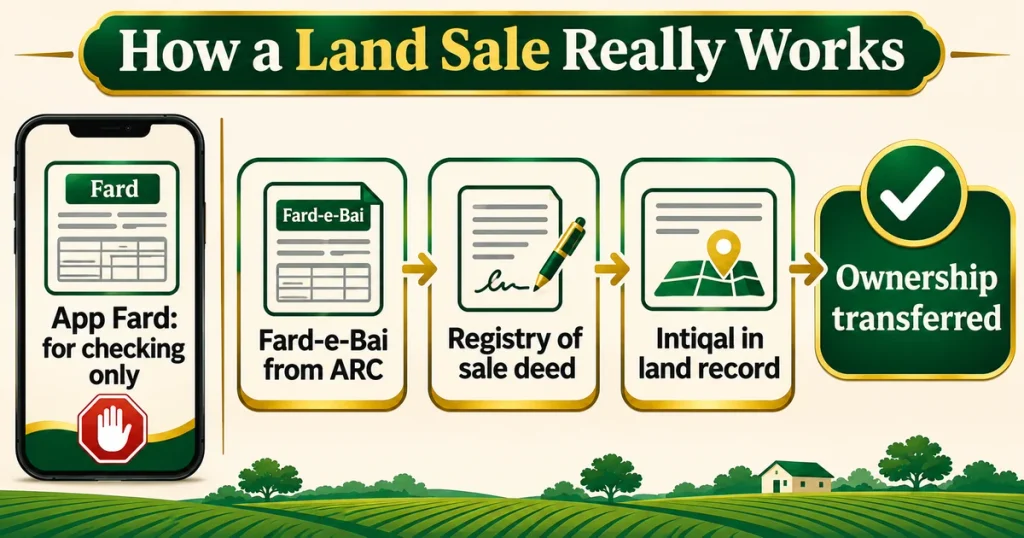
Not on its own. A Fard downloaded from the app is for checking and keeping your record. A sale follows its own path:
- The seller gets a Fard for sale (Fard-e-Bai) from the ARC, carrying the buyer’s name and CNIC.
- The sale deed is registered (registry) under the Registration Act 1908.
- The change is entered in the land record through intiqal.
Banks and courts may ask for a particular certified copy. Ask them in writing which document they accept before you pay for one.
What Happened to the Fard in 2026?
In July 2026, Punjab made the Green Property Certificate compulsory for property deals in place of the transactional Fard. Within days, a PLRA notification made the Fard and Naqal Arazi Record valid again for transactions, and in August the government told the Punjab Assembly the certificate was suspended for six months. Our guide on the Green Property Certificate explains where that stands now.
Getting a Fard at an Arazi Record Centre or Arazi Moawin
If online Fard Punjab does not work for you, or you need a Fard for sale, go in person. PLRA runs Arazi Record Centres (ARCs) across Punjab, plus Mobile ARCs for express service. Here is what to expect:
- Take your original CNIC; your fingerprints are verified through NADRA
- Give your district, tehsil, mauza and khewat or khasra numbers
- Pay through the PSID: Rs900 for ordinary service, Rs4,000 for express
- Read the Fard at the counter before you leave
Arazi Moawin is PLRA’s authorised franchise model for selected land-record services closer to home. The Punjab Zameen app can show your nearest ARC and Arazi Moawin, so use it, or the official PLRA website, to confirm a centre is genuine before handing over documents.
Online Fard Punjab for Overseas Pakistanis
Living abroad does not mean losing sight of your land. You have three official routes:
- The Punjab Zameen app, if you can complete its CNIC and mobile verification from abroad. Support for NICOP and foreign numbers is not clearly published, so check inside the app.
- A Pakistani embassy or consulate that offers PLRA land-record services. PLRA now charges an extra USD 50 per transaction for land records issued through foreign missions.
- A trusted relative with a properly made power of attorney, where the procedure allows it. Our power of attorney guides explain how to make one safely.
Be extra careful with agents who offer to “manage your Fard” from abroad for a fee. Your OTP and CNIC copy are the keys to your land record, so never hand them to a stranger.
Wrong Name, Share or Khewat? How to Fix Your Fard
Finding a mistake on your Fard is frightening, but most errors have a lawful fix. First decide which kind of problem you have.
A clerical mistake (Fard Badar): a misspelt name, a wrong CNIC or a data-entry slip. Apply at the ARC with proof. After checking the old record, a land-record officer approves the correction.
A real dispute: someone else’s name in place of yours, a missing heir, a reduced share or a fraudulent intiqal. This is not a typing fix. It needs the revenue officer or a civil court.
| Problem on your Fard | Lawful next step |
|---|---|
| Name or CNIC spelt wrong | Apply for Fard Badar correction at the ARC with your CNIC and old record |
| CNIC not linked to your land | Ask the ARC to link it, with registry or intiqal copies |
| Owner who died is still shown | Complete the inheritance mutation with all legal heirs |
| A legal heir is missing | Seek correction before the revenue officer, or go to civil court |
| Share or khewat looks wrong | Compare with old Fards and the registry, then apply for correction or challenge the entry |
| An intiqal you never made | Get certified copies at once and take legal action |
| Paid but no Fard received | Keep the PSID and receipt, and complain to PLRA before paying again |
Under section 53 of the Punjab Land Revenue Act 1967, a person aggrieved by an entry in the record can file a suit for a declaration of their right. Our guides on inheritance mutation, legal heirs in Pakistan and the civil suit for declaration explain each step. Revenue appeals have short deadlines, so act quickly.
The 1 Dangerous Mistake: Buying Land on a Fard Screenshot
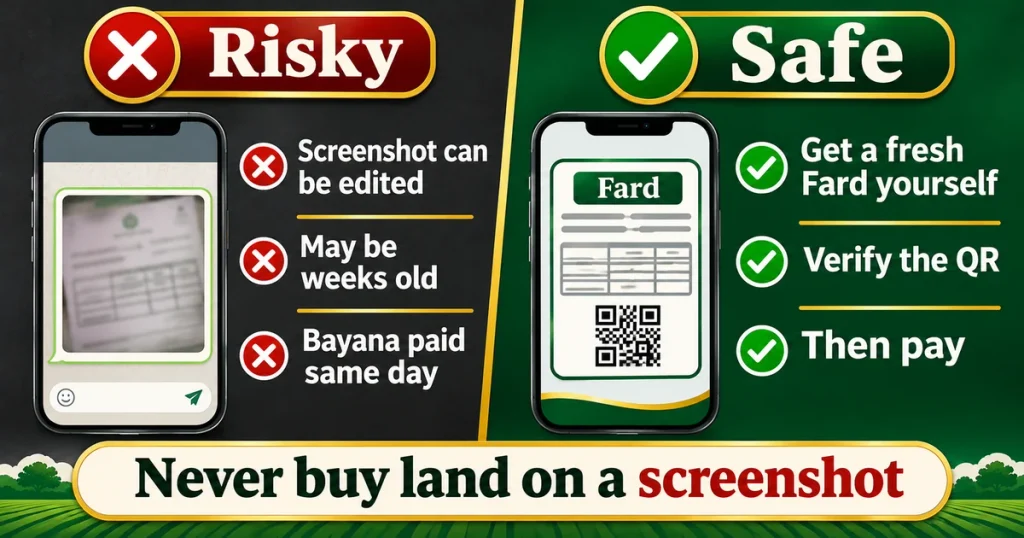
This is the mistake that still wipes out savings. A seller sends a Fard photo or PDF on WhatsApp, the buyer sees the seller’s name on it, and the bayana changes hands the same evening. A screenshot can be edited in minutes, and even a genuine Fard may be weeks old.
Before any payment, get a fresh Fard yourself from the app or the ARC, and verify it with the five checks above. It costs Rs900. The land may cost your life’s savings.
Other Fake Fard Traps to Avoid
- APK files or copies of the “Punjab Zameen” app shared on WhatsApp; install only from Google Play or the App Store
- Agents who ask for your OTP, app password or a CNIC photo “to process the Fard”
- Websites that look official but are not on punjab-zameen.gov.pk
- “Arazi Moawin” offices you cannot find in the app’s list of centres
- Requests to pay a “Fard fee” into a personal account or wallet
Daughters and sisters should be extra watchful. A woman’s share can quietly vanish when an inheritance mutation leaves her out, so check the record yourself. Our guide on women’s inheritance rights in Pakistan explains how to protect it.
Frequently Asked Questions
1. How can I get Online Fard Punjab?
Download the official Punjab Zameen app from Google Play or the App Store, sign up with your CNIC and mobile number, and complete identity verification. Then select your district, tehsil and mauza, find your khewat or khasra, pay through the PSID and download the Fard. If the app fails, visit any Arazi Record Centre with your original CNIC.
2. How can I check my Fard online by CNIC?
Use the official Punjab Zameen app or PLRA’s digital service and verify yourself with your own CNIC. You can then see land recorded in your name. If nothing appears, your CNIC may not yet be linked to the record, so visit the ARC with your registry or intiqal copies to get it linked.
3. Can I check land record in Punjab by name?
No official PLRA service has been announced that lets the public search anyone’s land by name. Searches are built around your own verified identity and land details such as the mauza and khewat number. Be careful with websites that promise a name search, because they may simply be collecting your data.
4. What is the online Fard Punjab fee?
Under PLRA’s charges for 2026-27, an ordinary copy of a Fard costs Rs900 and an express copy costs Rs4,000. Overseas Pakistanis using a foreign mission pay an extra USD 50 per transaction. Your challan may include other government charges, so always pay the exact amount shown on the PSID.
5. How do I download a PLRA Fard?
After payment, download the Fard from the Punjab Zameen app and save the PDF with your payment receipt. If you already have a request reference, you can also use the Print Fard option on the official online Fard Punjab website. Keep both the digital copy and a printed copy safely.
6. How do I verify a Fard online?
Scan the QR code and make sure it opens on an official punjab-zameen.gov.pk page. Then match the owner’s name, khewat, khasra, area and share with the record shown. For a Fard for sale, check that the buyer’s name and CNIC are printed. When in doubt, get a fresh Fard yourself.
7. Is Online Fard valid for selling property?
Not by itself. A Fard from the app is for checking and keeping your record. To sell, the seller needs a Fard for sale (Fard-e-Bai) from the ARC with the buyer’s name and CNIC, followed by a registered sale deed and an intiqal in the land record.
8. What should I do if I paid but did not receive my Fard?
Do not pay a second time. Keep your PSID, the bank transaction ID and a screenshot of the payment. Then contact PLRA through the complaint option in the Punjab Zameen app or the official PLRA website, or visit the nearest ARC with these details so staff can trace the payment.
Conclusion
Online Fard Punjab has made one of the oldest worries in Punjab much smaller. You can now check, on your own phone, whether your land is still recorded in your name, without a patwari, an agent or a long queue. That check costs less than a family dinner and can save years of court cases.
So make online Fard Punjab a habit. Pull a fresh Fard once in a while, and always before any deal. Never buy on a screenshot, never share your OTP, and fix any wrong entry as soon as you see it. If the problem is a real dispute and not a typing error, speak to a lawyer early.
Disclaimer: This article is for legal awareness only and is not legal advice. Every case depends on its own facts, documents and evidence. For your specific matter, consult a qualified lawyer.