

Online NTN verification by CNIC looks simple: enter 13 digits, complete a captcha and read the result. But one wrong assumption can create a bigger problem. A registration record is not the same as active filer status, an NTN is not the same as a sales-tax registration, and a private “NTN checker” should never receive your IRIS password or OTP.
This guide explains online NTN verification by CNIC through official Federal Board of Revenue channels, what the result actually proves, how to check ATL status separately, what to do if the record is missing or wrong, and which documents to preserve before you rely on the result for a bank, job, contract, property transaction or business dealing.
Quick safety rule: Use official FBR or IRIS services for the verification itself. Never share an IRIS password, PIN, OTP or email verification code with a person or website merely offering an NTN search. FBR’s own verification page directs income-tax verification users to the official system and warns against unauthorised verification resources.
Table of Contents
Online NTN Verification by CNIC: The Quick Answer
For a Pakistani individual who is registered with FBR, the 13-digit CNIC is used as the NTN or Registration Number. FBR’s registration guidance confirms that an individual uses the CNIC as the tax registration identifier, while an AOP or company normally receives a separate seven-digit NTN after e-enrolment.
The legal basis is section 181 of the Income Tax Ordinance, 2001. Section 181(4), introduced from tax year 2015 onward, provides that an individual’s CNIC is used as the National Tax Number. This does not mean that every person who merely holds a CNIC has automatically completed FBR registration.
For online NTN verification by CNIC, start from the official FBR Online Verification service and follow the current income-tax verification path to IRIS where directed. Enter the identifier in the format requested by the live portal, complete the security check and compare the returned information carefully.
If your real question is “Am I a filer?”, do not stop there. Check the Active Taxpayer List separately.
NTN, ATL and Sales Tax: Which Check Do You Need?
Many searchers type “NTN check” when they actually need one of several different results. Choosing the wrong service can give a correct answer to the wrong question.
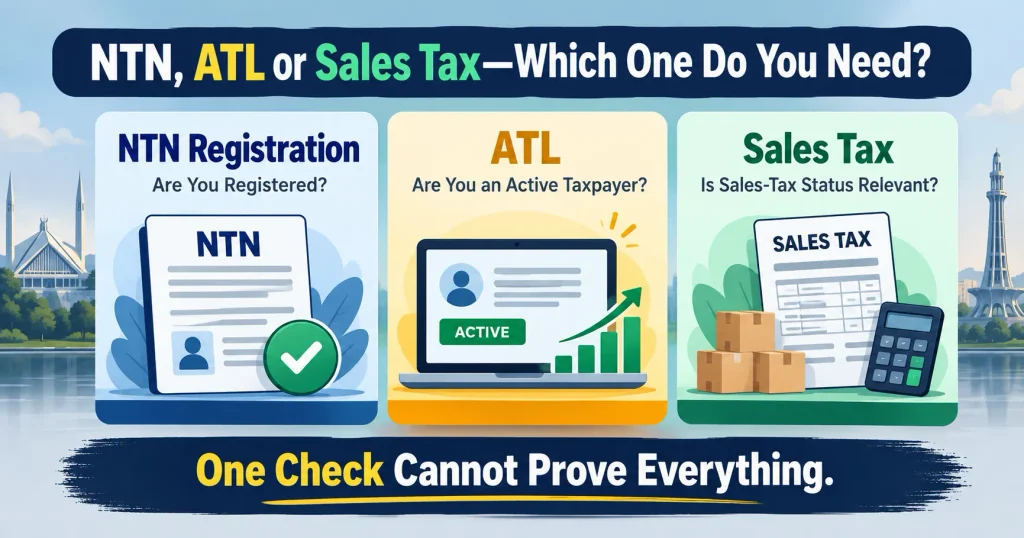
| What you want to know | Correct check | What it proves |
|---|---|---|
| Is an individual registered for federal income tax? | Taxpayer Profile/NTN inquiry | Whether FBR has a registration record linked to the identifier |
| Is the person currently an active income-tax filer? | Income Tax ATL check | Whether the CNIC/NTN appears on the current ATL |
| Is a business active for federal sales tax? | Sales Tax ATL/registration check | Federal sales-tax status, not merely income-tax registration |
| Do I need a new FBR profile? | IRIS registration route | Starts registration; it is not a verification result |
| Do I need registration proof for a bank or tender? | IRIS registration record | Proof of registration, subject to what the institution requests |
This distinction is the heart of online NTN verification by CNIC. “Registered,” “return filed,” “active on ATL,” “sales-tax registered” and “tax-compliant” are not interchangeable statements.
How to Do Online NTN Verification by CNIC Safely
Step 1: Start From an Official FBR Route
Do not begin from a random search result, WhatsApp link or sponsored “NTN checker.” FBR’s verification page warns users to rely on official verification resources and directs income-tax verification to IRIS.
Open the official FBR verification service or FBR website, then follow the current income-tax verification route. Portal labels can change, so rely on the official destination rather than an old screenshot from a video.
Step 2: Choose the Correct Inquiry
Look for the current taxpayer-profile or NTN inquiry option. Do not select ATL if your aim is to confirm registration details. ATL answers a different question: whether the person appears as an active taxpayer under the current rules.
Online NTN verification by CNIC should first establish the registration record. ATL can then be checked separately where filer status matters.
Step 3: Enter the Correct Identifier
For a Pakistani individual, use the 13-digit CNIC in the format requested by the portal, commonly without dashes. For an AOP or company, use the entity’s own seven-digit NTN or the identifier requested by the official form. FBR expressly distinguishes an individual’s 13-digit CNIC from the seven-digit NTN used by AOPs and companies.
A director’s, partner’s or employee’s CNIC is not automatically the NTN of a separate company or AOP.
Step 4: Complete the Security Check Yourself
Enter the captcha or other human-verification code yourself. A public search should not require you to hand over an IRIS password or OTP to a third party.
If a private website asks for your password, mobile code, email verification code or complete login credentials merely to “verify NTN,” leave the page.
Step 5: Read More Than the NTN Number
After online NTN verification by CNIC, do not look only for a “found” message. Compare the taxpayer’s name, category, registration details, business information and any jurisdiction or office information shown by the live system.
Ask whether the returned business is one you recognise. Check whether the name is spelled correctly. If an unfamiliar business, address or registration history appears, treat it as a discrepancy that needs an official follow-up.
Step 6: Save Evidence if the Result Matters
If you are checking the record before a contract, payment, tender, bank process or another important transaction, save a dated PDF or screenshot of the official result.
Mask unnecessary CNIC digits before sending a screenshot to someone else. A saved result is only a snapshot. Tax status can change, so recheck it near the transaction date if current status matters.
Step 7: Check ATL Separately for Filer Status
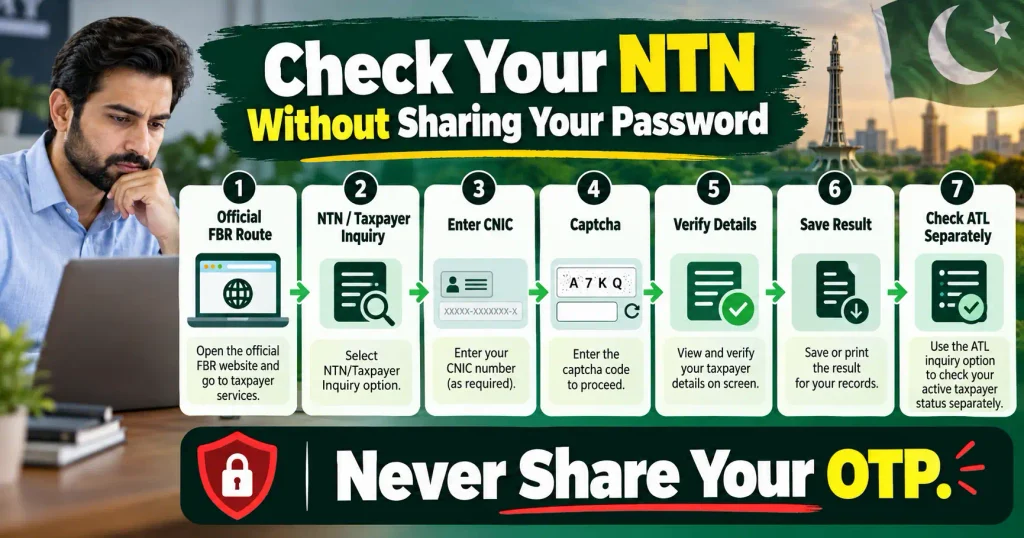
FBR provides separate methods for checking Active Taxpayer status. An individual can use the online portal, downloadable ATL or the official SMS method by sending ATL [space] 13-digit CNIC to 9966. An AOP or company uses its seven-digit NTN.
Use the official FBR Active Taxpayer Status guidance rather than an old third-party tutorial.
FBR announced on 18 October 2024 that ATL updating moved from a weekly process to a daily basis. Its current downloadable list also continues to show fresh updates, so old articles still telling users that ATL changes only on Monday are outdated.
What Does an NTN Verification Result Really Mean?
Online NTN verification by CNIC is useful only if the result is interpreted narrowly.
| Result | What it usually means | Safer next step |
|---|---|---|
| Profile found and details match | FBR has a registration record linked to the identifier | Check ATL separately if filer status matters |
| Profile found but ATL inactive | Registration exists, but current ATL conditions may not be met | Check return, acknowledgement and ATL requirements |
| No profile found | Search returned no registration record under the information entered | Recheck identifier and official route before registering |
| Details are wrong or outdated | Registration exists but particulars may need correction | Use the proper modification or support route |
| Unknown business appears | Possible old data, error or unauthorised use | Preserve evidence and contact FBR officially |
| Portal unavailable | That attempt proves nothing about registration | Retry through the same official service later |
A successful search does not prove that every return is correct, every liability is paid, or every business activity is genuine. It proves only what the official verification system returns for that identifier at that time.
NTN Found but ATL Inactive: Why This Happens
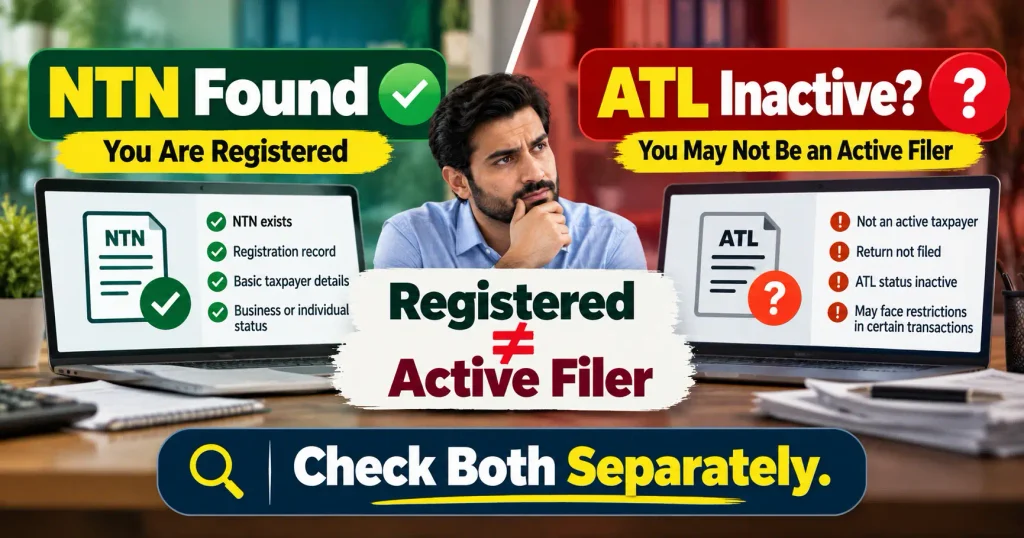
A common surprise is that online NTN verification by CNIC finds the taxpayer, yet the person is not active on ATL.
That can happen because registration and ATL inclusion are separate. Registration means the taxpayer has an FBR identity. Filing means a return has been submitted for a tax year. ATL status depends on the current legal and procedural requirements for inclusion.
Do not assume that a saved draft in IRIS is a filed return. Keep the electronic acknowledgement or completed-task record showing that the return was actually submitted.
The law governing late ATL inclusion has also changed over time. Finance Act 2026 amended section 182A, so a taxpayer should not copy an old surcharge amount from a pre-2026 article and assume it is still correct. FBR officially lists Finance Act 2026 as the current Finance Act.
For a wider explanation of registration, returns, penalties and taxpayer duties, see Qanooni Dastak’s Income Tax Ordinance 2001 guide.
“No Record Found”: What Should You Do Next?
A no-record response after online NTN verification by CNIC should not trigger panic or an immediate second account.
First, recheck all 13 CNIC digits. Confirm that you selected CNIC rather than NTN, STRN or another identifier. Remove dashes if the live field requires digits only, refresh the captcha and try again through the official route.
If you believe you registered earlier, recover or investigate the existing record before creating a new registration. Duplicate or conflicting profiles can turn a simple access problem into a harder correction issue.
If repeated official checks show no profile and registration is genuinely required, use the official FBR income-tax registration guidance. FBR’s current guidance explains the online-registration route for individuals and the information or supporting documents that may be required, particularly where the taxpayer carries on a business.
Registration is not the same as filing a return. Do not invent income, assets, expenses or business details simply to complete a profile or obtain a particular tax status.
Wrong Details? Do Not Ignore the FBR Record
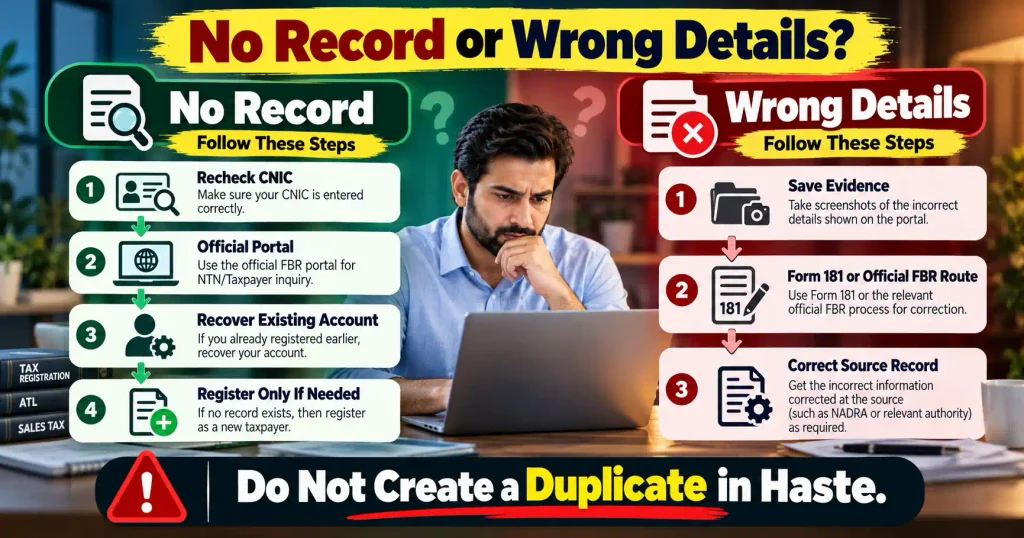
Online NTN verification by CNIC can reveal an old mobile number, outdated address, wrong business information or another mismatch. Preserve the result first and identify the exact field that is wrong.
FBR’s current guidance says Registration Form 181 in IRIS can be used for changes including a mobile number, personal or residential address, business address, business branches, legal representative and bank account.
FBR treats some other changes differently. Its guidance identifies matters including CNIC updating, email, deregistration and certain other registration issues for separate official handling. Follow the live procedure applicable to the field you actually need to change.
Use the official FBR guidance for changing registration details rather than editing an FBR document yourself.
Do not alter an FBR PDF in Word, Canva, Photoshop or a PDF editor so the details “look correct.” Correct the source record.
If an institution wants documentary registration proof rather than a public search result, Qanooni Dastak’s FBR NTN Certificate guide explains that separate process.
Protect Your CNIC During Online NTN Verification by CNIC
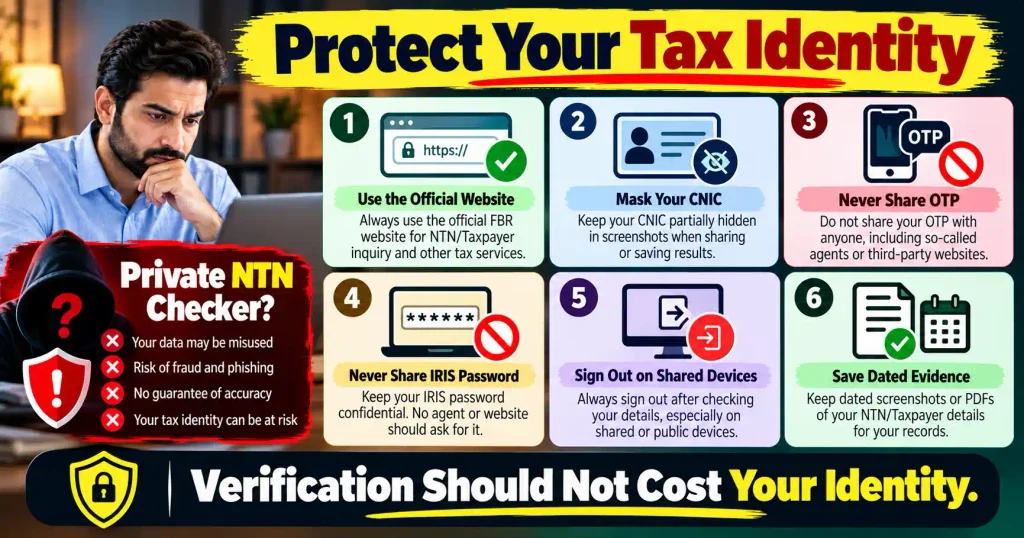
The convenience of online NTN verification by CNIC should not make you careless with identity information.
Use only the information the official inquiry actually asks for. Do not upload a CNIC image when a simple number field is enough. Never give an agent your IRIS password, OTP, email access or mobile verification code merely to check a public result.
On a shared computer, sign out of IRIS and avoid saving the password in the browser. When sharing screenshots, mask unnecessary digits and private contact details.
If you receive a message claiming that “your NTN will be blocked today” unless you click a link, open FBR independently instead of trusting that message.
Qanooni Dastak’s Online Fraud guide and Cyber Crime in Pakistan guide explain why copied branding, fake official messages and urgent links should be treated carefully.
Registration Is Not the Same as Filing a Return
Online NTN verification by CNIC answers a registration question. It does not decide whether a person was legally required to file, whether a submitted return was accurate, whether tax remains payable, or whether the taxpayer is active for every tax purpose.
FBR’s general income-tax due-date guidance currently lists 30 September for individuals and AOPs, 31 December for companies, and 30 September for companies having a special tax year. Extensions or special directions can affect a particular year, so always check current FBR notices near the deadline.
The official FBR income-tax due-date page should therefore be preferred over a date copied from an old blog post.
This is also why an NTN result should not be used as a shortcut for full due diligence. A supplier may have an income-tax registration but not the sales-tax status a transaction requires. A person may have an NTN but not be active on ATL.
The official check must match the exact question you need answered.
Documents to Keep After Online NTN Verification by CNIC
Where money, a contract or a formal submission depends on the result, preserve a sensible evidence trail:
- a dated screenshot or PDF of the official verification result;
- current ATL proof where filer status matters;
- the registration record where an institution requests NTN proof;
- return acknowledgement where filing is relevant;
- correspondence with FBR about any correction;
- documents submitted for a Form 181 modification or official correction; and
- the transaction date where status was checked for property, banking, tender or contractual purposes.
Do not collect unnecessary copies of another person’s full CNIC merely because an online search is possible. Collect only the information genuinely needed for the lawful purpose.
Common Mistakes That Make an NTN Check Misleading
Several simple mistakes can turn online NTN verification by CNIC into misleading evidence:
- treating an NTN as proof of active filer status;
- using a private checker instead of the official FBR route;
- sharing an IRIS password or OTP for a public inquiry;
- searching a company through a director’s CNIC;
- assuming “no record” automatically means no tax obligation;
- creating a second IRIS profile when access is the real problem;
- ignoring an unfamiliar business or address;
- relying on an old ATL screenshot for a current transaction;
- confusing income-tax NTN with sales-tax registration; and
- editing an official document instead of correcting FBR’s source record.
A good online NTN verification by CNIC process is not about collecting more screenshots. It is about asking the right question, using the right official service and understanding the limits of the answer.
FAQs About Online NTN Verification by CNIC
1. How can I do online NTN verification by CNIC in Pakistan?
Start from FBR’s official Online Verification service or FBR website and follow the current income-tax route to IRIS where directed. Choose the taxpayer-profile or NTN inquiry, enter the 13-digit CNIC in the format requested, complete the security check and compare the returned details. If you need filer status, use the separate ATL service.
2. Is my CNIC automatically my NTN in Pakistan?
For a registered Pakistani individual, the 13-digit CNIC is used as the NTN or Registration Number. Section 181(4) applies this identifier rule from tax year 2015 onward. However, simply possessing a CNIC does not prove that FBR registration has been completed. Confirm the registration through the official system.
3. Does online NTN verification by CNIC prove I am a filer?
No. Online NTN verification by CNIC can confirm that an FBR registration record exists, but active-filer status is checked separately through the Active Taxpayer List. If a bank, buyer, employer or authority asks whether you are a filer, current ATL proof is more relevant than merely showing an NTN.
4. How can I check filer status by SMS?
For an individual, type ATL [space] 13-digit CNIC and send it to 9966. For an AOP or company, use ATL [space] 7-digit NTN. This checks ATL status; it is not a full taxpayer-profile inquiry and does not download an NTN registration certificate.
5. What should I do if FBR says “no record found”?
Recheck the CNIC digits, identifier type, captcha and official portal first. If you were registered before, recover or investigate the existing account instead of immediately creating another profile. If you are genuinely unregistered and registration is required, use the official IRIS registration route and follow current FBR requirements.
6. Can I verify a company or AOP with a director’s CNIC?
A separate company or AOP normally uses its own seven-digit NTN or Registration Number. A director’s or partner’s personal CNIC is not automatically the entity’s NTN. Use the identifier requested for that taxpayer category and compare the returned legal name before relying on the result.
7. What if online NTN verification by CNIC shows an unknown business?
Save a dated copy of the result, secure your IRIS credentials and review the registration and filing history available to you. Do not ask an unknown agent to “remove” the record. Contact FBR through an official channel and preserve evidence of your query. Suspected identity misuse may require separate legal or professional advice.
8. How often should I repeat online NTN verification by CNIC?
Repeat the check whenever current status will be relied upon for a transaction, application or compliance purpose. Registration details can change, while ATL status is dynamic. A months-old screenshot should not be treated as present proof where a bank, tender, property transaction or contracting party requires current status.
Conclusion: Verify the Record, Then Verify the Status
Online NTN verification by CNIC is a useful first check, but only when you understand what it proves. Confirm the registration through the official FBR route, compare the returned details, check ATL separately when filer status matters, and preserve dated evidence for an important transaction.
The safest rule is simple: verify the right record through the right authority. If the result is missing, unfamiliar or wrong, do not guess and do not create a duplicate profile in haste. Correct or investigate the official record before relying on it.
Disclaimer
This article provides general legal and tax awareness about online NTN verification in Pakistan. It is not individual tax, legal or financial advice and does not create a lawyer-client relationship. FBR portals, deadlines, forms, ATL rules and procedures can change. For a disputed registration, filing obligation, significant tax liability or suspected identity misuse, check the latest official FBR material and obtain advice from a qualified Pakistani tax professional.