
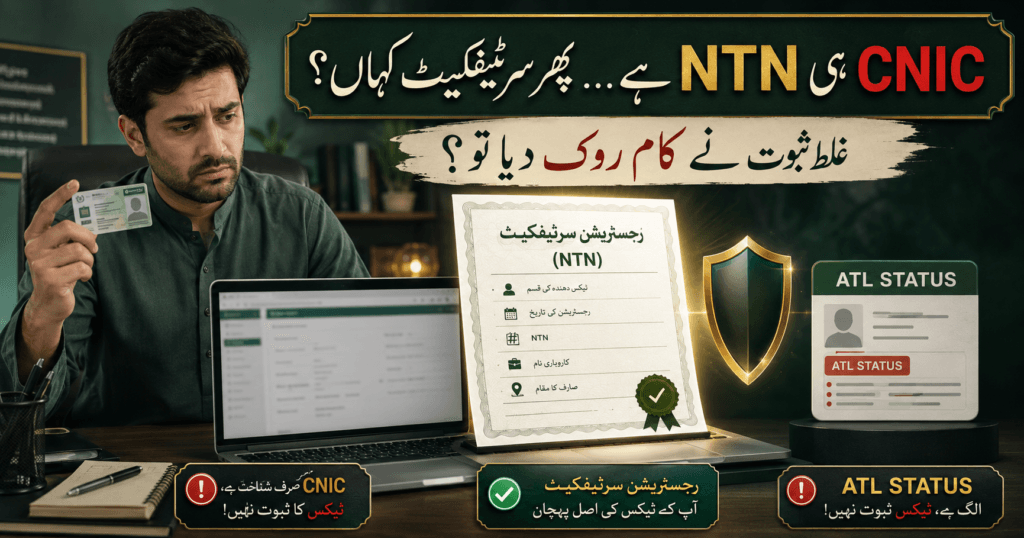
A bank, client, tender office, employer, or business platform asks for your FBR NTN certificate. You know that you registered with the Federal Board of Revenue, but the IRIS portal shows forms, records, menus, and status screens instead of one obvious button marked “NTN Certificate.” That small request can quickly become frustrating—especially when different websites mix up registration proof, NTN verification, and filer status.
The good news is that the process becomes simple once you know which record you actually need. This guide explains how to find, save, print, and check an FBR NTN certificate through official FBR channels. It also explains the difference between an individual’s CNIC, a company’s NTN, a registration record, and the Active Taxpayer List (ATL), so you do not submit the wrong document at an important moment.
Table of Contents
FBR NTN Certificate: The Answer in 60 Seconds
| Your question | Correct answer |
|---|---|
| What is commonly called an FBR NTN certificate? | A printable FBR/IRIS taxpayer registration record showing that a person or entity is registered. The exact on-screen label may appear as a registration form, registration order, or registration profile. |
| Can an individual use a CNIC? | Yes. From tax year 2015 onward, an individual’s 13-digit CNIC is used as the NTN, but the person must still be registered with FBR. |
| What number does a company or AOP use? | Normally the seven-digit NTN or Registration Number issued after e-enrollment. |
| Does an FBR NTN certificate prove filer status? | No. Registration and ATL status are separate. Check the current ATL separately. |
| Where should you start? | Use the official FBR Online Services page or go directly to IRIS 2.0. |
| Can CNIC alone download the private record? | CNIC identifies an individual, but access to the IRIS account normally also requires the correct password and verification through registered contact details. |
What Is an FBR NTN Certificate Really?
An FBR NTN certificate is the name commonly used for documentary proof of a taxpayer’s registration with FBR. In the modern IRIS system, the document may not always carry that exact title. Depending on the taxpayer type and the current portal design, a user may see a submitted registration form, a processed registration record, an order, or a printable profile.
The important question is not whether the PDF has a decorative heading. The important question is whether the document comes from the official IRIS account and correctly shows the taxpayer’s identity and registration particulars.
A useful registration printout may show information such as:
- taxpayer name;
- CNIC, NTN, or Registration Number;
- taxpayer category;
- registered address;
- business name or activity, where applicable;
- registration date or status;
- tax office or jurisdiction; and
- reference or barcode information generated by the system.
The exact fields can vary. Never edit the downloaded PDF to “improve” its appearance. If information is wrong, correct the official record instead of changing the document yourself.
The Legal Rule Behind an FBR NTN Certificate—and the CNIC Confusion
Section 181 of the Income Tax Ordinance, 2001, amended up to 30 June 2026, deals with taxpayer registration. Its current text requires taxpayers to apply for registration in the prescribed form and manner. Section 181(4) states that, from tax year 2015 onward, an individual’s CNIC is used as the National Tax Number.
That rule is often shortened into the sentence “CNIC is NTN.” The sentence is useful but incomplete. A random CNIC does not automatically prove that its holder has completed FBR registration. The number is the same for a registered individual, but registration must still exist in the FBR system.
FBR’s own taxpayer registration guidance makes the identifier rule clear:
- an individual uses the 13-digit CNIC as the NTN or Registration Number;
- an AOP or company normally uses the seven-digit NTN received after e-enrollment; and
- a foreign national may use the applicable passport or registration route.
This is why an FBR NTN certificate for an individual may display the CNIC as the tax identifier, while a company’s record shows a different seven-digit number.
FBR NTN Certificate, NTN Verification, ATL, and STRN Are Not the Same
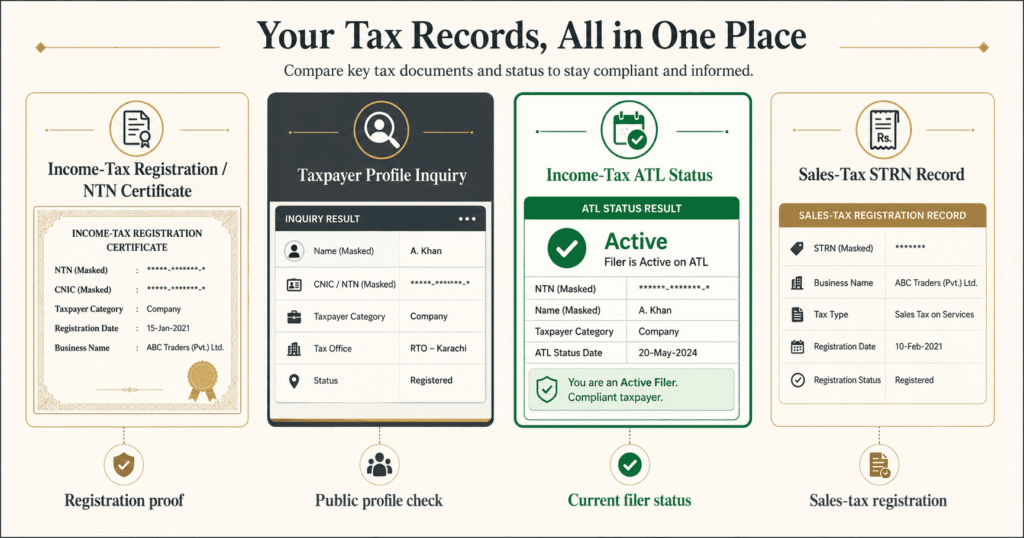
Many people download the wrong screen because four different records are treated as if they mean the same thing.
| Record | What it proves | What it does not prove |
| NTN registration record | The taxpayer is registered and has an NTN or Registration Number | That the taxpayer filed the latest return or is currently active on ATL |
| Taxpayer Profile Inquiry | Publicly available registration/profile information found through official verification | Full ownership of the account or current filer status |
| ATL status result | Whether the person or entity appears on the relevant Active Taxpayer List | The complete registration history or every tax obligation |
| STRN or sales-tax record | Federal sales-tax registration/status where applicable | Income-tax ATL status or provincial sales-tax registration |
If your goal is only to confirm whether an NTN exists, use Qanooni Dastak’s separate guide to online NTN verification by CNIC. If a bank, tender authority, or client specifically asks for an FBR NTN certificate, ask whether it wants the IRIS registration printout, a public verification result, or current ATL proof. One clear question can prevent rejection later.
Before You Download: Keep These Details Ready
Downloading an existing FBR NTN certificate should not require you to create a second registration. Keep the following details ready:
- the official IRIS address;
- the individual’s CNIC without dashes, or the AOP/company’s NTN;
- the IRIS password;
- access to the mobile number and email registered with FBR;
- a PDF reader or a browser that can save a page as PDF; and
- the name, address, and business details that should appear on the record.
If the CNIC is already registered, do not open another account through an agent. Recover the existing account first. Duplicate or conflicting registration attempts can create confusion that is harder to fix than a forgotten password.
FBR’s current registration process page also stresses the importance of using a mobile SIM registered against the individual’s own CNIC and a personal email address. These details matter because password recovery and security codes depend on them.
How to Download an FBR NTN Certificate in 7 Careful Steps
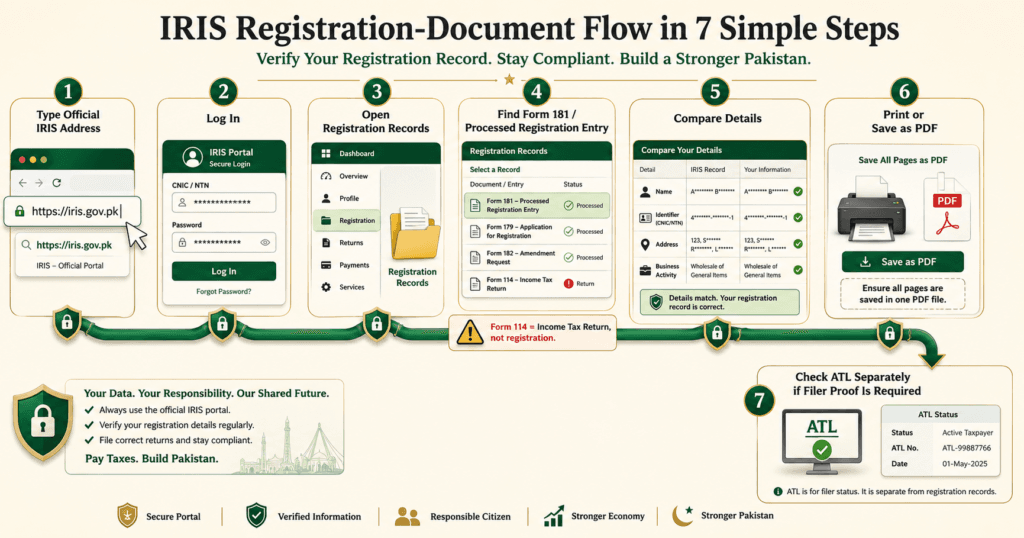
IRIS menus can change after updates, so the wording on your screen may not be identical to an old video or screenshot. Follow the record type and form number, not an outdated menu colour.
Step 1: Open the Official FBR Route
Start from the official FBR website or IRIS 2.0. Check the domain before entering a CNIC, password, email code, or mobile code. A private website may explain the process, but it should not receive your IRIS password or OTP.
The old FBR verification page now directs income-tax users toward IRIS. Bookmark the official address instead of trusting a link sent through an unknown WhatsApp message.
Step 2: Log In With the Correct Identifier
For an individual, enter the 13-digit CNIC/Registration Number without dashes and the IRIS password. For an AOP or company, use the relevant NTN or Registration Number and authorized credentials.
If you only know the CNIC but do not control the registered email or mobile number, do not pay a stranger to “bypass” security. Use the official recovery process or contact FBR.
Step 3: Find the Registration Record
After login, open the area for registration records, declarations, tasks, or submitted forms. Search for 181 (Form of Registration filed voluntarily) (Income Tax), a processed registration record, or another registration entry that matches your taxpayer type.
Do not follow instructions telling you that “114(1) Registration” is the NTN form. Section/Form 114 concerns the return of income; registration is connected with section 181. A portal label may change, but that legal distinction does not.
Step 4: Open the Submitted or Processed Version
An unfinished draft is not the same as a completed registration record. Open the submitted, completed, or processed version that reflects the taxpayer’s official particulars. Check the tax period and reference number so that you do not print an abandoned draft or an unrelated modification request.
If more than one registration entry appears, compare the dates and status. The latest approved or processed record is usually more useful than an older version, but the receiving institution may ask for a specific order or form.
Step 5: Check Every Important Detail
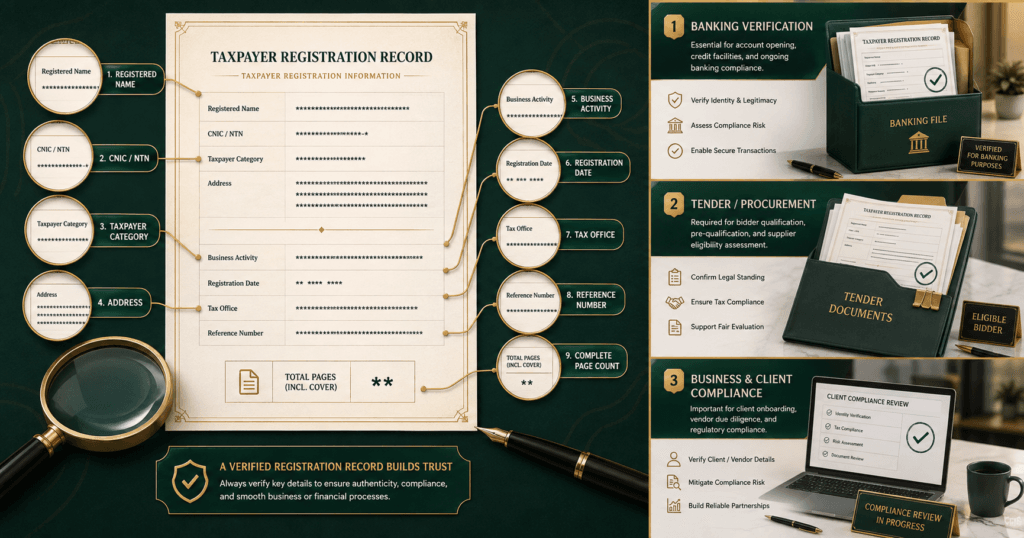
Before saving the FBR NTN certificate, compare the displayed information with the CNIC, SECP record, partnership deed, bank record, and business documents, as applicable.
Look closely at:
- spelling of the registered name;
- CNIC or seven-digit NTN;
- taxpayer type;
- residential and business address;
- principal business activity;
- bank account details, if displayed;
- registration date; and
- jurisdiction or tax office.
Do not ignore a small error because “the number is correct.” A name or address mismatch can create questions when the document is compared with a bank account, tender file, payment platform, or company record.
Step 6: Print or Save the Record as PDF
Use the portal’s print icon if available. If the record opens as a printable page, use the browser’s print command—Ctrl + P on Windows is common—and choose Save as PDF. Give the file a clear private name, such as NTN-Registration-Record-2026.pdf, without placing a full CNIC in the filename.
Open the saved PDF before closing IRIS. Confirm that all pages, reference numbers, headings, and important fields are visible. A blank, cropped, or password-screen PDF will not help the person who requested registration proof.
Step 7: Verify the Status Separately
The downloaded FBR NTN certificate proves registration information; it does not automatically prove that the taxpayer is an active filer. Use the official online verification/Taxpayer Profile Inquiry for registration and the separate ATL service for current filer status.
Save only the proof actually requested. If a tender requires both registration and ATL status, provide two clearly named documents instead of claiming that one FBR NTN certificate proves both.
What If No Registration Record Appears?
First decide whether the person is already registered.
If the Taxpayer Profile Is Found
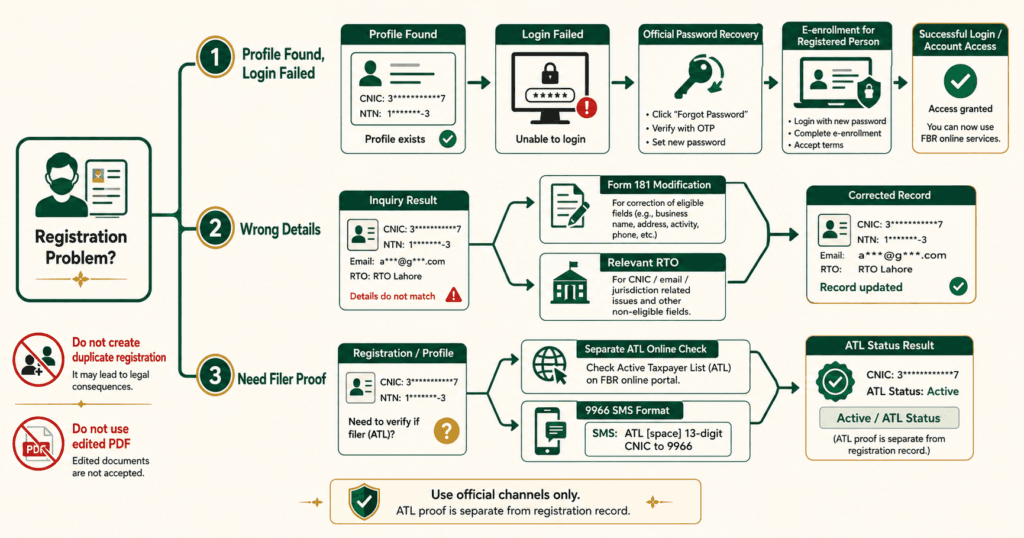
If public verification finds the CNIC or NTN, but you cannot see the record after login, the most likely problem is account access, an old registration, an incorrect login, or a record located under a different IRIS menu. Try official password recovery and search the completed/submitted sections before starting a new registration.
FBR explains that a person who already has an NTN or Registration Number but lacks credentials can use the E-enrollment for Registered Person route. Its IRIS login guidance distinguishes recovering access from registering for the first time.
If No Taxpayer Profile Is Found
The individual may need fresh registration. FBR states that online registration is available for individuals, while AOP and company procedures and documents differ. Review the official requirements before registration rather than copying another person’s document list.
Do not promise that every FBR NTN certificate will appear instantly. Portal load, incomplete information, document review, taxpayer type, or a discrepancy can affect the process. Use the status shown in IRIS and the official FBR support route instead of relying on a fixed unofficial deadline.
Can You Download an FBR NTN Certificate Using Only a CNIC?
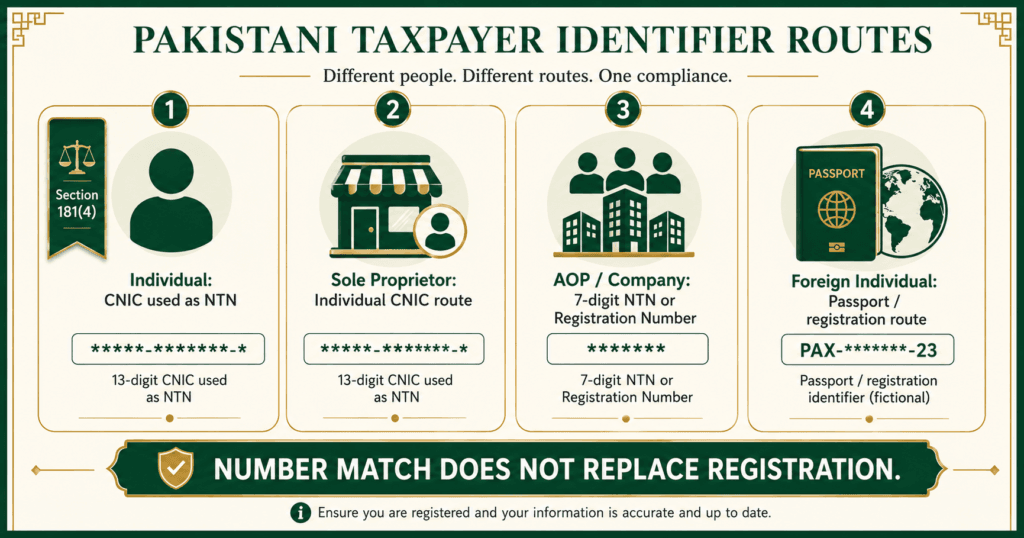
For a registered individual, the CNIC is used as the NTN/Registration Number. It can therefore be used to identify the account and, with valid credentials, access the registration record. But CNIC alone should not unlock a private IRIS document.
There are two different actions:
- Public check: Enter a CNIC in the official Taxpayer Profile Inquiry to view available registration information.
- Private download: Log in to the taxpayer’s IRIS account with the CNIC/Registration Number and password, then open and print the relevant registration record.
This privacy boundary is important. A public result can help verify a taxpayer, but it should not expose full account documents to anyone who knows a CNIC.
How to Check NTN by ID Card Without Confusing It With ATL
To check registration by ID card, open the official FBR Online Verification Portal through FBR Online Services, select the taxpayer-profile or NTN inquiry option available in IRIS, choose CNIC, enter the 13 digits without dashes, complete the verification code, and compare the result.
Check the name, category, registration details, and reference information. If the record belongs to someone else or shows an unknown business, preserve screenshots, secure the IRIS account, and contact FBR promptly.
Do not send NTN CNIC to 9966 expecting an FBR NTN certificate. FBR’s official ATL guidance uses 9966 for active-taxpayer status:
- individual:
ATL [space] 13-digit CNICto 9966; - AOP/company:
ATL [space] 7-digit NTNto 9966.
That SMS answers an ATL question, not an FBR NTN certificate download question.
Wrong Name, Address, Mobile, Email, or Business Details
Do not edit an FBR NTN certificate in Word, Canva, Photoshop, or a PDF editor. A changed file is not an official corrected record.
FBR divides corrections between IRIS and the relevant Regional Tax Office. According to its Change Your Personal Details guidance, Registration Form 181 filed for modification can be used in IRIS for matters including:
- mobile number;
- personal or residential address;
- business address;
- addition of business branches;
- legal representative; and
- bank account.
FBR states that matters such as updating the CNIC number, email, Pakistan Origin Card, jurisdiction, discontinuance of business, or deregistration may require a visit to the relevant RTO with supporting documents.
| Problem | Safer first action |
| Old residential or business address | File the appropriate registration modification in IRIS with supporting evidence where required |
| Wrong CNIC or POC | Contact the relevant RTO; do not create a second identity |
| Lost access to old email/mobile | Use official recovery and FBR/RTO support according to the field that must be changed |
| Unknown business activity | Save evidence, secure the account, review Form 181 history, and report the discrepancy |
| Name mismatch with SECP or CNIC | Check the source record and use the correct FBR/SECP correction route |
FBR does not promise one universal correction time for every case. Avoid publishing or relying on a guaranteed “three-day” or “five-day” result.
Forgotten Password or No Access to the Registered Mobile
On the IRIS login page, select Forgot Password and provide the requested details. FBR’s password guidance states that codes are sent to the registered email address and mobile number before a new password can be set.
If one of those contacts no longer belongs to you, use FBR’s official support or the relevant RTO. The FBR contact page currently lists the national helpline as 051 111 772 772, the international number as 0092 51 111 772 772, and helpline@fbr.gov.pk. Recheck the official page before calling because contact details can change.
Never send your password, OTP, PIN, or complete IRIS credentials to a number found in a comment, sponsored message, or unverified tax group.
Is There an “FBR Active Taxpayer Certificate”?
People often use this phrase when they actually need proof that a person is a filer. The FBR NTN certificate and active-taxpayer proof are different.
FBR provides an online ATL status check, an SMS method, and downloadable ATL records. It does not describe a general NTN registration printout as an “active taxpayer certificate.” If an institution asks for one, confirm whether it wants:
- a current ATL status printout;
- an online ATL verification result;
- an extract from the downloaded ATL;
- the NTN registration record; or
- both registration and ATL proof.
The ATL is a changing status. A saved result from months ago may not answer whether the taxpayer is active today. Check it again close to the date of submission.
Common Download Problems and Practical Fixes
| Problem | Likely reason | Practical response |
| CNIC already registered | An IRIS account already exists | Recover the existing account; do not register again |
| “Invalid registration number or password” | Wrong identifier, password, or account route | Remove CNIC dashes, confirm taxpayer type, and use official password recovery |
| No FBR NTN certificate button | IRIS may show a registration form/order instead of that label | Search registration records and Form 181; open the submitted/processed version |
| PDF is blank or cropped | Browser print settings or pop-up handling | Reopen the record, enable the required pop-up, print all pages, and inspect the saved PDF |
| Public inquiry works but IRIS login fails | Registration exists but credentials/contact details are unavailable | Use E-enrollment for Registered Person or official recovery/support |
| FBR NTN certificate shows wrong details | FBR profile is outdated or incorrect | File a modification or visit the relevant RTO, depending on the field |
| NTN exists but ATL shows inactive | Registration exists, but current ATL conditions are not met | Check return filing and ATL requirements separately |
Protect Your Tax Identity While Getting an FBR NTN Certificate
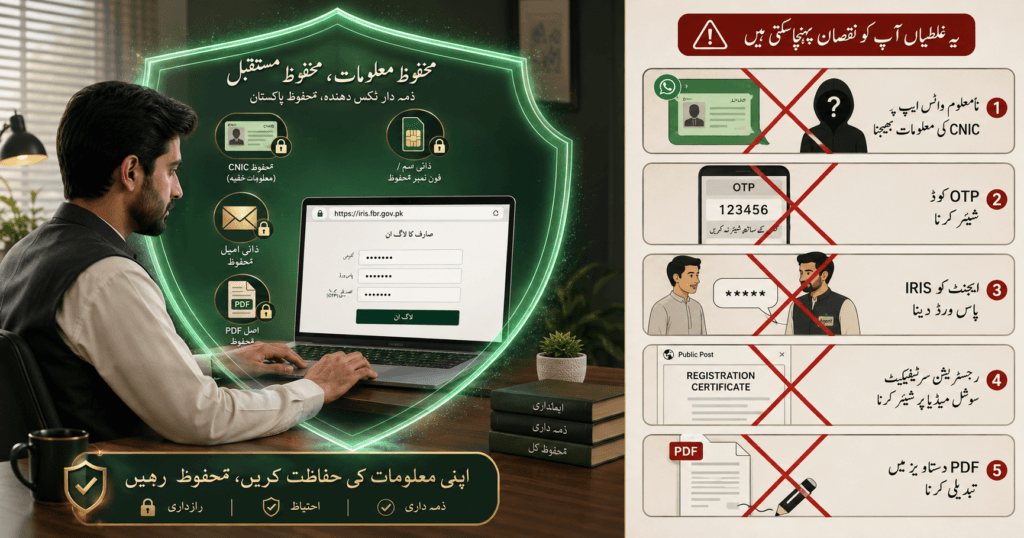
An FBR NTN certificate may contain enough information to support impersonation, fake account recovery, or social-engineering attempts. Treat it as a private compliance document.
Follow these rules:
- Type the official FBR or IRIS address yourself.
- Use your own SIM and email for recovery codes.
- Never share an OTP, password, PIN, or recovery code.
- Mask the CNIC when a full number is not genuinely required.
- Ask why a person needs the document and how it will be stored.
- Send a password-protected copy where appropriate.
- Keep an unedited original in a secure folder.
- Change the IRIS password immediately if an unauthorized person received it.
If an unknown person creates a tax profile, files a return, or uses your identity, the problem may also involve digital fraud. Read Qanooni Dastak’s guides on online fraud in Pakistan and cyber crime in Pakistan for evidence-preservation and reporting principles. Do not post the suspected person’s CNIC publicly.
A 10-Point Checklist Before You Submit the PDF
Before sending the FBR NTN certificate to a bank, client, employer, or tender office, check:
- The document came from the official IRIS account.
- The registered name is correct.
- The CNIC/NTN belongs to the correct taxpayer.
- The taxpayer type is correct.
- The current address and business details are accurate.
- The PDF contains every required page.
- The file is readable and not cropped.
- No password, OTP, or unnecessary private data is being shared.
- The receiving institution has confirmed what proof it wants.
- ATL status has been checked separately if current filer proof is required.
Frequently Asked Questions
How can I get my NTN certificate?
If you are already registered, log in to official IRIS with your CNIC/NTN and password, find the submitted or processed registration record—usually connected with Form 181—and print or save it as PDF. If you are not registered, complete the applicable FBR registration process first. The portal may call the document a registration form, record, order, or profile instead of an FBR NTN certificate.
Can I download my FBR certificate using my CNIC?
Yes, a registered individual uses the 13-digit CNIC as the NTN or Registration Number. You can download an FBR NTN certificate after signing in to the correct account. However, CNIC alone is not enough for a private download; you normally need valid IRIS credentials and access to the registered contact details. A public CNIC inquiry can show limited profile information but is not the same as downloading the account’s registration record.
How can I download my tax certificate?
First ask which tax document is required. An FBR NTN certificate is only one kind of tax record. If “tax certificate” means NTN registration proof, open the registration record in IRIS and save it as PDF. An exemption certificate, CPR, sales-tax certificate, ATL result, or withholding certificate is a different document with a different official route.
Is CNIC your NTN number online?
For an individual registered with FBR, yes: the 13-digit CNIC is used as the NTN from tax year 2015 onward. However, a CNIC number by itself does not prove completed FBR registration. Verify the taxpayer profile through the official portal.
How to check NTN by ID card?
Open the official FBR Online Verification Portal through the FBR website, choose the taxpayer-profile or NTN inquiry option, select CNIC, enter the 13 digits without dashes, complete the captcha, and compare the returned details. For a full step-by-step explanation, use the linked Qanooni Dastak NTN-verification guide.
Is NTN the same as CNIC?
Only for an individual is the number generally the same. An AOP or company normally receives a separate seven-digit NTN or Registration Number. A foreign individual may use the applicable passport or registration route. In every case, the FBR registration must actually exist.
How do I get my FBR certificate?
To get an FBR NTN certificate, log in to IRIS, search the submitted/completed registration area for the relevant Form 181 or processed registration record, open it, check the details, and print or save it as PDF. If an office demands a stamped or specially certified version, ask that office what exact document it requires and confirm availability with FBR or the relevant RTO before visiting.
What is the FBR NTN number?
It is the tax-registration identifier used by FBR. For a registered individual, it is the 13-digit CNIC. For an AOP or company, it is generally the seven-digit NTN issued after e-enrollment. The FBR NTN certificate displays this identifier with the taxpayer’s registration information. It helps identify the taxpayer in IRIS and official tax records.
How to get FBR active taxpayer certificate?
FBR provides ATL status verification rather than treating the NTN registration document as an active-taxpayer certificate. An FBR NTN certificate proves registration, not current ATL status. Check the current status through the official ATL portal, use the prescribed 9966 SMS format, or print the relevant ATL result. If a bank or tender office asks for an “active taxpayer certificate,” confirm whether it wants the latest ATL printout, NTN registration record, or both.
Important Tax and Legal Disclaimer
This article is intended only for general legal awareness and education. It does not provide tax, accounting, legal, or professional advice and does not create a lawyer-client relationship. FBR law, IRIS menus, forms, portal functions, and administrative procedures may change. Verify the current position through official FBR resources or consult a qualified tax professional or lawyer for your specific facts. Also read Qanooni Dastak’s full Disclaimer.
Editorial Source Note
This original guide was prepared from publicly available official material, including the FBR Online Services page, IRIS, FBR taxpayer-registration guidance, the Income Tax Ordinance updated to 30 June 2026, FBR personal-details guidance, and official ATL instructions. Competitor wording was not copied. Portal labels should be rechecked on the publication/update date.